Sophos Firewall Config Studio V2: More Than a Viewer
Network Sophos SecurityTable of Contents
In February, Sophos released the Configuration Viewer, a tool that finally made one major Sophos Firewall weakness a bit less painful: reading, searching, and comparing configurations without suffering through raw XML. I already covered that original tool here: Sophos Firewall Configuration Viewer: Audit and Compare Configs.
On April 15, 2026, Sophos followed up. The previous Configuration Viewer becomes Config Studio V2. That matters because the renaming is more than cosmetics. Sophos is clearly treating it not just as a viewer anymore, but as a browser-based tool that is now supposed to edit as well.
That is what makes the tool interesting. Reading is one thing. In real firewall operations, you almost always need three things at once: understand, compare, and change cleanly.
And that is exactly where my criticism starts. As good as the tool is in many ways, it is hard to ignore that Sophos is once again building these capabilities outside the actual firewall and outside Sophos Central or the Firewall Manager. In some areas, this side tool already feels more modern and more powerful than the firewall UI itself or the central management layer. From an admin perspective, that is difficult to justify.
Anyone who has watched Sophos for a while knows the pattern. Visible UI improvements come very slowly. From an admin perspective, it felt like it took ages before widescreen monitors were handled properly. At the same time, the old UTM still had the friendlier change logging in some places, where it was easier to see which user changed what. Exactly these quality-of-life topics keep sitting there for years, while each release tends to prioritize features that sound strategically strong or fit nicely into analyst and vendor slide decks.
If you want Sophos’s own official overview first, here is the video:
The best admin functions should live where admins work every day.
What Config Studio V2 Actually Is
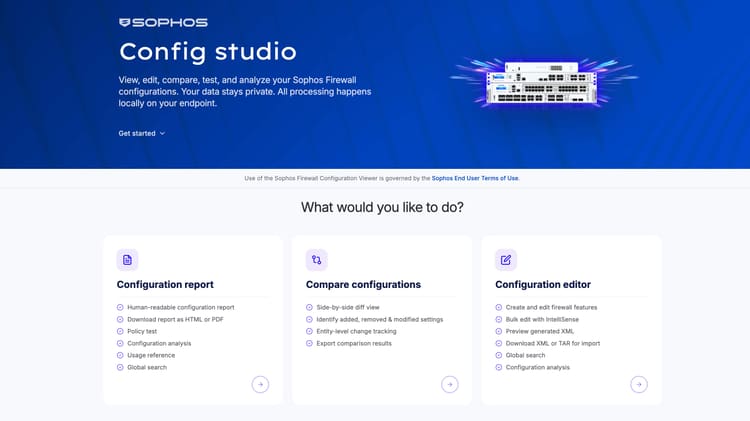
Sophos describes Config Studio V2 as a browser-based tool for viewing, analyzing, comparing, and now also editing firewall configurations. At first glance, that sounds like a new version with a new name. In practice, it is more than that.
The official direction is fairly clear:
- read a single configuration as a full report
- compare two configurations
- create a new configuration from scratch
- change an existing configuration directly in the tool
- export the result again as XML, TAR, API, or
curloutput
This is the point where the tool moves from “helpful documentation utility” to “real working tool”. At the same time, it also makes more visible what Sophos still has not solved properly inside the firewall and Central.
The official Sophos video also makes clear that Config Studio V2 now goes well beyond the original viewer. Sophos shows, among other things:
- creating new configurations from scratch
- importing and editing existing XML configurations
- creating firewall rules and changing their order
- detecting shadowing and resolving it by moving or deleting rules
- bulk changes, for example enabling logging across many rules
- showing object references
- detecting duplicate or unused objects
- importing objects in bulk from CSV and other formats
- creating cloud objects from vendor data such as Microsoft JSON
- exporting configurations again as XML or TAR
Those are not gimmicks. Those are real admin features.
Why This Matters In Practice
In theory, we handle firewall changes cleanly through processes, tickets, peer review, and test plans. In reality, you often sit in front of an export, a diff, an old secondary firewall, or a newly inherited environment and first need to understand what was built there at all.
That is exactly where Config Studio V2 shows its value.
For Audits and Reviews
If you have to take over a foreign Sophos Firewall, the web UI is often not the best starting point. You click through NAT, firewall rules, objects, interfaces, VPNs, and special cases, lose the thread, and end up with screenshots and notes across multiple tabs.
A clean configuration report is much easier to work with. Instead of navigating menus, you get a coherent view of rules, policies, and settings. For reviews and audits, that is genuinely useful.
For Change Windows
The compare part is even more relevant to me. For larger changes, I do not just want to know that something was changed. I want to see clearly what was added, removed, or modified.
For WAN migrations, NAT rewrites, VPN changes, or cleanup of historically grown rule sets, a proper diff saves real time and reduces the chance of touching unrelated things by accident.
For MSPs, Handover, and Migrations
Anyone who manages many firewalls or hands environments between teams knows the same issue. The configuration often lives in several places at once:
- on the firewall itself
- in the ticket
- in a spreadsheet
- in some wiki
- and in the head of the person who originally built it
Config Studio V2 helps close that gap a bit. Not as a replacement for good documentation, but as a much better starting point for handovers and reviews.
What Really Changed Compared With the Old Viewer
The original Configuration Viewer was mainly a reading and diff tool. That was already helpful, because Sophos XML is not built for human eyes.
With V2, the decisive new step is editing.
Sophos now explicitly calls it a configuration editor. That means you can no longer only import and analyze exports, but also change configurations in the tool, download them again, and use API or curl output if needed.
That API and curl output is interesting to me, not because every firewall admin will suddenly automate everything, but because it makes changes more reproducible and easier to document or integrate into existing workflows.
That is especially relevant for teams that want more controlled and repeatable firewall changes without building a full infrastructure-as-code platform first.
That is also why the rename from Viewer to Studio feels a little like “we are gradually building this into something bigger on the side”. The more functions land there, the more obvious the question becomes: why are they not landing directly in the firewall or in Sophos Central?
How the Workflow Looks In Practice
The basic workflow is still simple. Config Studio V2 also works on exported configurations.
1) Export the Configuration
Sophos still expects the Entities.xml from the firewall configuration. The workflow is:
- go to
Backup & firmware > Import exportin WebAdmin - export a full or selective configuration
- unpack the downloaded
API-xxxxxx.tar - upload the contained
Entities.xmlinto Config Studio
That matters because the community quickly noticed the same thing: the direct input is not the TAR itself, but the extracted Entities.xml.
2) Read a Report or Start a Comparison
From there, the tool essentially gives you two directions:
- read and analyze a single configuration
- compare two configurations
For many admins, even the first point is already useful. Especially when you need to know where an object is used, which rule groups really exist, or how a given policy is built.
3) Now New: Edit
With V2, the new step is editing: change a configuration, download it again, and reuse it in XML, API, or curl form.
That does not make Config Studio a replacement for the firewall UI. But it clearly moves the tool toward a real change-workbench.
Where I See the Biggest Value
I see four practical use cases where Config Studio V2 makes immediate sense.
Preparing Larger Changes
If you need to understand which rules, objects, or NAT relationships are changing before a maintenance window, a structured report plus before-and-after diff is far nicer than XML and UI hopping.
Reviewing Existing Rule Sets
Many Sophos environments grow for years. Old host objects, duplicate services, historical NAT rules, and project leftovers stay around. A tool that makes those things easier to read helps not only with new changes, but also with cleanup.
Handovers To Other Teams or Providers
Not everyone who needs to review a configuration should require direct admin access to the firewall. A clean export or report can be a better basis.
Moving Toward More Reproducible Changes
The API and curl output is the clearest signal to me about where Sophos wants to take this. Not just visibility, but more structured change handling.
That becomes relevant for teams that want to standardize parts of their firewall changes without going fully into infrastructure as code.
What Is Missing Directly In SFOS
This is where my real criticism starts.
As useful as Config Studio V2 is, many of these functions would be even more valuable if they were not external at all. If we talk about real admin ergonomics, these are exactly the kinds of things I would rather see directly inside SFOS:
- bulk editing for firewall rules
- enabling, disabling, or moving multiple rules at once
- finally cloning NAT rules properly
- renaming objects in bulk
- adjusting host, service, or FQDN references through search and replace
- identifying and cleaning unused objects
- detecting and merging duplicates
- seeing rule conflicts while building rules
- cloning or moving blocks of rules
- before-and-after comparisons before committing changes
- bulk object imports without needing a side tool
For larger environments, that would improve daily operations massively. Instead, we still go through export, unpack, upload, and then the way back. It works, but it is not elegant.
And I am being deliberately critical here: the video makes it quite clear that Sophos prefers shipping useful usability features in a separate browser tool instead of seriously modernizing the firewall UI and Sophos Central. We are still waiting for very basic things like a proper clone function for NAT rules. At the same time, conflict detection, bulk editing, object analysis, and cloud imports are landing in the Studio. That may be faster to build and easier to whitelist from the vendor’s point of view. From an admin point of view, it creates a parallel world where the best comfort features do not live where the work actually happens.
That is why Config Studio feels to me not only like a new tool, but also like confirmation. It suggests that Sophos has been stuck for years when it comes to firewall UI and Central. The low-hanging fruit is still lying around, while an external tool suddenly solves things that the main platform had more than enough time to address.
Why the Import and Export Model Still Does Not Fully Convince Me
For quick reviews, the model is okay. For productive changes, it still feels somewhat awkward from an admin perspective.
As soon as a tool works on exported configurations, a few practical risks appear immediately:
- the exported configuration may already be outdated
- several admins may be working in parallel while the export lags behind
- sensitive firewall data now sits as files on laptops or in project folders
- drift can appear between analysis, editing, and re-import
That does not mean Config Studio V2 is bad. It means the workflow still feels more like a workaround than the cleanest native solution.
For audits and planning, it fits. For everyday administration, I would still prefer more of this directly in the firewall.
From a security perspective, there is another point: Sophos says the processing stays local in the browser. That is good, and clearly better than uploading entire firewall configurations to some remote cloud service. But it still remains a trust model you have to accept consciously. These are not harmless files. They often contain highly sensitive configuration data with network segments, objects, rules, NAT relationships, VPN definitions, and other security-relevant details depending on the export.
The uncomfortable part is not only the question “does anything go to Sophos or not?” It is the whole browser context. You load sensitive data into a web-delivered tool, and you must trust the delivered application, the local processing, the browser itself, possible extensions, local caches, and the way these export files are handled on the admin system. Even if everything technically stays local, that is still a different trust and attack surface than a well-integrated feature inside the firewall or the central management layer.
That is why deeper integration into SFOS or Sophos Central would be the much cleaner path. Not only for convenience, but also because roles, approvals, auditability, and handling of sensitive configuration data could then be kept in one place.
There is one more point from the video: not all configuration components are fully supported yet. The tool itself warns about that on import. Unsupported parts can be removed or kept, but then they are not fully visible inside the Studio. That is understandable for an early stage, but it also shows that this is still not a full replacement for the real admin surface.
Where the Tool Still Has Limits
The tool is not perfect yet. These points are still missing or not fully clean today:
Linked NAT Rules Can Look Like “Any”
In the official feedback thread, Sophos notes that linked NAT rules can currently appear as Any for source or destination in some cases. The reason is not presented as a classic display bug, but as a limitation of what can be derived reliably from the exported XML.
That matters because later analyses, such as rule shadowing or rule quality checks, can be misleading if the representation itself is not fully accurate.
Sophos Central .backup Files Are Not a Clean Input Yet
Another community question was whether encrypted Sophos Central backups with the .backup extension would eventually be supported. As of now, they are not, because Config Studio is built around Entities.xml, and the encrypted Central backups cannot be used directly.
For MSPs especially, that would obviously be useful. Right now, it remains a future wish.
Edge Cases Will Still Exist
In the first days after release, there were already hints of deviations in certain special cases. That is not unusual for a young tool, but it is why I would currently use it like this:
Use Config Studio V2 as a strong analysis and preparation tool, but still validate critical edge cases against the real firewall UI and real traffic.
Conclusion
Sophos Firewall Config Studio V2 is one of those tools that looks less spectacular at first glance than it actually is in real operations.
It is not a security feature in the narrow sense. It does not block attacks and it does not patch vulnerabilities. But it reduces friction in exactly the area where many mistakes happen: understanding and changing firewall configurations.
That has real value.
The old Viewer was already useful. With V2, it becomes something you should take much more seriously for audits, migrations, rule cleanup, and larger changes. Not as the only truth, but absolutely as a very useful working surface around Entities.xml.
At the same time, the value of this tool also highlights what Sophos needs to bring much closer to the firewall and to Sophos Central. The best example for me is detecting overshadowed rules. That is not a bonus. That is exactly the kind of help you want while building and sorting rules.
My real conclusion is bigger than this one tool: Config Studio feels like confirmation that Sophos has relied too long on workarounds instead of real product care around the firewall UI and Central. With today’s agentic development tools, it is of course possible to build an external helper quickly and throw it at admins as a workaround. But that must not become the long-term answer. A workaround is still a workaround, even when it looks polished.
Until next time,
Joe