Spotify Xirp: A Command Center for Coding Agents
Ai Apps SecurityTable of Contents
If you only have one coding session open in one repository, you do not need a new command center. A terminal, one agent, and a clean Git branch are often enough.
Things become harder to follow once Codex is building a feature, Claude Code is investigating a bug, and Gemini is exploring a second idea in parallel. Which agent is waiting for approval? Which branch contains the changes? Which session belongs to which project? And how do you stop two agents from changing the same checkout at the same time?
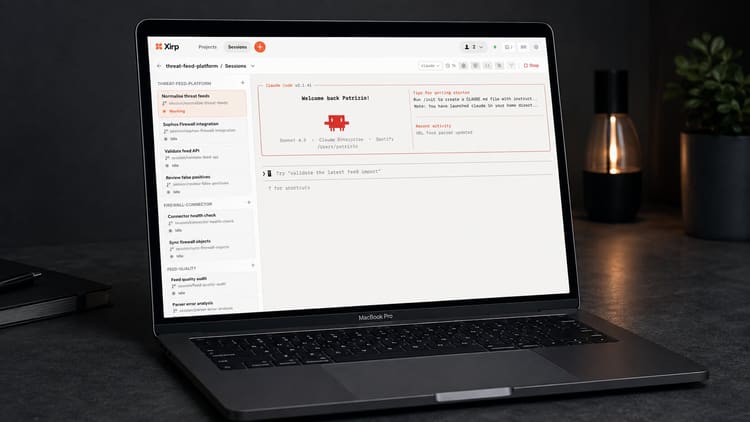
This is exactly the problem Xirp aims to solve. The name comes from Spotify, but it has nothing to do with music, playlists, or the Spotify app. Xirp is a macOS application for working with AI coding agents. It brings projects, persistent terminals, Git worktrees, files, rules, and skills into one interface.
At first, that sounds like another AI IDE. But that description is too narrow. Xirp does not include its own language model, nor does it replace Codex, Claude Code, or Gemini. The app organizes agents that are already installed and configured on the Mac.
Xirp does not make coding agents smarter. It makes parallel work with them easier to understand and control.
What Xirp Actually Is
Spotify describes Xirp as an agentic development environment. Put more plainly, it is a graphical control surface for multiple local coding-agent sessions.
A session is a persistent terminal running an agent. It can belong to a local project and its own Git worktree, or it can run without project context. When creating one, you select Codex, Claude Code, or Gemini, describe the goal, and decide whether the agent should work in the existing checkout or a new worktree.
Xirp continues to use the vendors’ native command-line tools. Credentials, models, subscriptions, permissions, and agent-specific settings remain in their respective configurations. Installing Xirp therefore does not automatically give you access to Claude, Codex, or Gemini, and it does not add any model allowance.
Xirp is currently in beta and only runs on macOS. The software is proprietary, not open source. Spotify requires a work email address for registration. According to the FAQ, personal addresses from services such as Gmail, Yahoo, or Outlook.com are not accepted.
What Can Xirp Actually Do?
Its practical value does not come from one spectacular button. It comes from bringing several tasks that are often separated today into one place.
Projects and Persistent Sessions
A project is initially just a local folder on the Mac. It can be a single Git repository, a folder without Git, or a parent folder containing several repositories. Xirp uses it as the working directory for sessions.
The terminals are persistent. You can close the app, reopen it later, and continue a session. The project overview shows current and previous sessions together with their branches and worktrees. Status indicators show, among other things, whether an agent is working, waiting for input, or has finished. Notifications can tell you when a session needs attention.
That sounds ordinary, but it is valuable in daily work. With three or five parallel tasks, the hardest question is often no longer whether an agent can write code. It is knowing which agent is doing what and where its result lives.
Git Worktrees Instead of Agents in the Same Checkout
For a new session, Xirp can create a dedicated Git worktree with a separate branch and working directory. This allows several agents to work on the same repository without rewriting the same files in the same checkout at the same time.
A worktree is not magical conflict prevention. If two branches change the same function in different ways, someone still has to understand and resolve the conflict later. Accidental changes outside the worktree are not automatically prevented either. Isolation organizes the work, but it does not replace code review, tests, or branch protection.
When cleaning up, Xirp deliberately treats the session, worktree, and branch as separate things. That is sensible because closing a terminal should not automatically delete a checkout containing uncommitted changes.
Terminal, Files, Git, and Multiple Agents in One View
The session view is an interactive terminal. You can respond, approve permissions, and use agent commands exactly as you would in the native CLI. You can also search and edit files, inspect diffs, view branches and commits, and open external editors or terminals in the correct worktree.
Xirp’s grid view places several running terminals side by side. This is especially useful when two sessions are actively working while a third is waiting for a decision. You can also fork a conversation to explore a second approach without giving up the original thread.
According to the documentation, you can switch to another installed agent during a session. The working directory and project state remain available. Xirp does not, however, translate agent-specific settings. Switching from Claude Code to Codex therefore does not mean every configuration detail will automatically behave in exactly the same way.
Rules and Reusable Skills
Xirp displays supported project and global instruction files such as AGENTS.md and CLAUDE.md. It also discovers reusable skills from supported folders. Such skills can describe a release check, a migration, or a fixed verification workflow.
This part matters more than it first appears. An agent without local rules can produce syntactically correct code while still violating repository conventions. Xirp cannot improve the quality of those rules, but it makes the instructions and repeatable procedures associated with a project more visible.
A Realistic Workflow
Suppose a web application needs a larger update. A dependency must be upgraded, an existing bug investigated, and the documentation adjusted. In Xirp, that could become three separate sessions:
- Codex updates the dependency in its own worktree and runs the tests.
- Claude Code analyzes the existing bug in a second branch.
- Gemini checks the affected documentation or explores an alternative solution.
The three terminals remain visible in grid view. The Git view shows which branch changed which files. If an agent is waiting for approval, you do not have to search through terminal windows. The results can then be reviewed, tested, and merged individually as needed.
This is where Xirp has a sensible role. It primarily helps not with the first agent, but with the third, fifth, or tenth parallel workstream. In its own launch article, Spotify even refers to more than 50 parallel sessions and more than 36,000 sessions run internally. Those are vendor figures from Spotify’s environment, not an independent productivity study.
More parallelism does not automatically mean more productivity. Every additional agent creates results, questions, potential conflicts, and costs. If you start ten sessions, you must be able to understand and take responsibility for ten working states. Xirp makes that burden more visible. It does not remove it.
What Spotify Portal Adds
Xirp works without Spotify Portal. Persistent terminals, local projects, worktrees, grid view, files, Git, skills, and rules are all part of the standalone app.
Portal adds the organizational layer. It maintains a software catalog containing services, dependencies, ownership, and other metadata. Workspaces can also collect wiki pages, technical decisions, links, tasks, members, and earlier sessions. Xirp can launch a session from a catalog entity or Workspace and provide the relevant context through MCP.
This is intended to solve a familiar problem in larger organizations: an agent may see the repository, but it does not automatically know who owns an upstream service, why an architectural decision was made, or which constraints another team has already documented.
Portal can provide this context on demand instead of placing every document in the initial prompt. After a session, its history can be manually uploaded to the Workspace. Team members and future agents can then build on what was already learned.
This is Xirp’s most strategically interesting aspect. It is also the part that depends most heavily on well-maintained metadata, permissions, and documentation. An outdated software catalog does not automatically create reliable organizational knowledge. It simply gives an agent outdated context with greater confidence.
For small teams, Portal may therefore be unnecessary infrastructure. For an organization with many repositories, changing ownership, and recurring duplicated work, a shared context layer can provide real value.
Security: Local Does Not Automatically Mean Offline
Spotify clearly documents that registering a local project does not upload its files to Portal. Xirp works with the folder on the Mac, and a Portal upload of a session must be initiated manually.
That does not mean the entire coding workflow remains offline. The selected agent still communicates with OpenAI, Anthropic, Google, or another configured model provider according to its own settings. Which prompts, code excerpts, and tool results are transferred depends on the native agent configuration. Xirp’s local project management does not change those data flows.
Session Uploads Contain More Than the Chat
According to Spotify, uploading a session to Portal shares the complete conversation, tool calls, file changes, agent reasoning, and file paths. It can include code excerpts and any information the agent processed during the session.
Most importantly, Xirp does not remove secrets, credentials, personal data, or confidential content before upload. The user must review the history and must not upload problematic sessions.
For production use, I would set at least these rules:
- Start agents only with the permissions required for the specific task.
- Use autonomous modes and permission bypasses only in clearly constrained environments.
- Use a separate, disposable worktree for risky work.
- Check session transcripts for secrets and customer data before every Portal upload.
- Keep branch protection, tests, code review, and secret scanning in place independently of Xirp.
Worktrees protect against accidental overlap in the same checkout. They are not a security boundary for shell commands, network access, or permissions on the Mac. Those remain the responsibility of the selected coding agent’s sandbox and approval controls.
Local Data and Telemetry
By default, Xirp stores its local state under ~/.xirp. Spotify describes its optional usage telemetry as pseudonymous and says it excludes prompts, code, file paths, and free text. It can be disabled in Settings or with XIRP_TELEMETRY=0.
Those statements are positive, but Xirp remains proprietary software. Unlike an open-source project, its implementation cannot be fully examined in public source code. Organizations should therefore assess not only the interface, but also contractual terms, data flows, retention, and the permissions granted to connected agents.
Who Is Xirp For?
Xirp is not essential software for everyone who occasionally opens a coding agent. Its value depends heavily on how many sessions, repositories, and people need to be coordinated.
| Situation | Assessment |
|---|---|
| A single session in one repository | The native CLI is usually simpler. |
| Several parallel tasks in the same repository | Worktrees and session status can add a lot of order. |
| Switching between Codex, Claude Code, and Gemini | Xirp offers a shared interface, but each agent remains separately configured. |
| Many repositories in a small development team | Projects, grid view, rules, and skills can be useful. |
| Organizational knowledge for many teams | The main value only appears with Portal and a maintained catalog. |
| Windows, Linux, or sessions on a server | Not supported in the current beta. |
For me, the dividing line is simple: if terminal tabs, branch names, and a normal task list are still enough, Xirp is an extra layer. If several agents regularly run in separate worktrees and you are losing track of them, the app addresses a real problem.
Getting Started and Current Limits
Spotify offers Xirp downloads for Apple silicon and Intel Macs. There is also a terminal installation script. As with any curl | sh installer, you should inspect the script before running it or use the direct app download.
After installation, the key steps are straightforward:
- Create a Spotify Technology account with a work email address.
- Install and authenticate the desired agent CLIs separately, and configure their permissions.
- Register a local project in Xirp.
- Use a new worktree instead of the main checkout for the first real task.
- Describe the goal and completion criteria clearly enough for the agent to know when the task is done.
- Review changes and the transcript before merging anything or uploading it to Portal.
The beta still has clear limitations. Xirp currently runs on neither Windows nor Linux. There is no server mode and no way to host remote sessions over SSH in Xirp. Automatic transcript uploads are not currently supported; eligible Workspace sessions are deliberately shared manually. Screens and behavior may change quickly during the beta.
The product page currently offers beta access and advertises a free Portal trial. I would not treat that as a promise of a permanently free product or as evidence of future team pricing. Organizations adopting Xirp should account not only for model subscriptions, but also Portal licensing, administration, review effort, and the handling of stored sessions.
Basis and Limitations of This Article
I have not tested Xirp in a production multi-agent setup for this article. The feature descriptions and security details are based on the official Xirp documentation, FAQ, product page, and Spotify’s launch article, checked on August 25, 2026.
I therefore cannot make reliable claims about stability, resource usage, speed, or actual time savings. Interfaces, supported agents, and Portal features can change quickly, especially during a beta.
My Conclusion
Xirp addresses a problem that only becomes visible once coding agents are no longer used one at a time, but as parallel workers. Persistent terminals, Git worktrees, status indicators, diffs, and grid view are not revolutionary ideas on their own. Bringing them together in an agent-focused interface can still make everyday work much easier to manage.
The larger ambition lies in the connection to Spotify Portal. If services, ownership, architectural decisions, and earlier sessions are genuinely maintained and available when needed, an agent does not have to start from zero every time. That is more interesting than another model selector.
The risks also lie in this connection. A complete transcript can reveal far more than a commit. A worktree does not prevent dangerous shell commands. And a local project says nothing about which data the selected agent sends to its model provider.
I already feel this burden very clearly myself. Several projects are running in Codex, a terminal is open beside them, my Hermes Agent is working too, and more questions and approvals are waiting in the inbox. Everything runs in parallel, everything eventually asks for attention, and I am expected to keep the context, priorities, and results in my head at the same time. At times, it feels like a kind of mental burnout, if that is the right term.
The work has not only become faster. It also reaches me through more and more parallel streams. Not long ago, the bottleneck was completing one task more quickly. Today, it is often bringing five running tasks back onto one line. Projects, sessions, questions, approvals, and results need an understandable workflow, otherwise the speed gained becomes a burden itself.
Many vendors and open-source projects are currently trying to solve exactly this new coordination problem. Xirp is one approach. Buzz is another: it aims to bring people, multiple projects, and multiple agents together under one roof. I recently wrote in more detail about the idea behind Buzz and its shared workspace.
For individual developers with one session, the native CLI is probably still the more direct route. Anyone coordinating several agents, branches, and projects in parallel on a Mac should keep an eye on Xirp. Not because Spotify has built a better agent, but because coordinating the existing agents is becoming a tool problem of its own.
Until next time,
Joe