After Arc, I’m sticking with Cra
ToolsTable of Contents
Arc was a big reason I went from a 16 GB M3 MacBook Air to an M5 with 32 GB. Was a browser really worth paying for that much memory? Apparently so. A few weeks into using Cra, I think I’d make a different call.
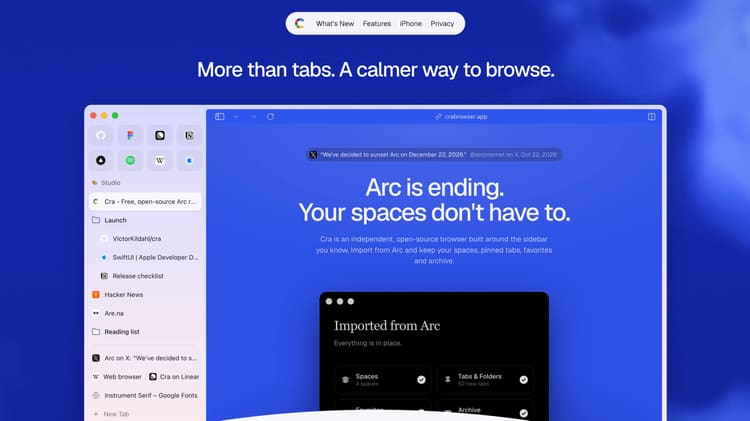
What kept me in Arc fits in a sidebar. If I’ll need a page tomorrow, I pin it there. That tab is now my bookmark, right where I left it. I can skip the trip to a separate favourites bar. When I switch from one company’s work to another’s, or back to my personal accounts, I swipe to the right Space. It took remarkably little time for all of that to become second nature.
Arc stops working on macOS and Windows on 22 December 2026. When I wrote about my search for a successor in October, I wanted to give it some time. I’m glad I did. My Mac shortlist came down to three browsers: Ardia, Yab and Cra. Cra is the one I open now.
Ardia
Going by GitHub alone, I’d have picked Ardia. On 23 November it had 2,911 stars, well ahead of the other two. GitHub listed 62 contributing user accounts and two bots, with two people accounting for most of the commits. Ardia also had a genuine head start. Its first public Mac build shipped on 25 September, nearly a month before Arc announced its shutdown date.
There’s one thing I’d take straight from Ardia: its ad blocker. Ardia ships uBlock Origin. Filter lists, page elements I’ve hidden and exceptions for individual sites all have a home in the browser’s settings. If I turn blocking off for a site, I can find it there later and switch it back on with a click. I’d love that in Cra.
Why does Ardia open some sites in WebKit when it usually runs Chromium? Take a film on Netflix. A browser might know how to play the video format, but the film arrives encrypted. To play it, the browser also needs a content protection system the streaming service supports. Chrome uses Google’s Widevine. Shipping Widevine in an independent Chromium browser requires a separate agreement with Google. Google itself charges no fee to use it. Ardia says it is still waiting for Google’s approval, so on the Mac it opens those services in WebKit. If the service offers the film through Apple’s FairPlay, it can play there using the same protection system as Safari.
Ardia deliberately takes its visual cues from Dia. The sidebar was there and so were the profiles. Of the three, though, I preferred using Cra. A bigger community was a good reason to give Ardia a proper try. It couldn’t make me want to use its interface every day.
Yab
My early hesitation about Yab came down to the combination of closed source and a single developer. What happens to the browser holding my personal and work accounts if Serafim Korablev no longer has time for it? On 15 November 2026, he announced that the Mac, iPhone and Android source was public. Other people can now investigate a bug and contribute a fix.
WebKit cut both ways for me. Yab felt light on my Mac and used memory sparingly. Even extensions from the Chrome Web Store could run through WebKit’s extension system, though compatibility depends on the extension. I still wanted Chromium available for my daily work. The Mac release now opens pages in Chromium by default on Apple Silicon. WebKit remains an option and handles protected video, for instance. That took care of one of my early reservations. What stayed with me was simpler: I preferred Cra’s colours and the way things moved.
Cra
The name? Well. The first swipe between two Spaces did a better job of selling me on it. The colour changes, the sidebar slides across, and by the time my eye finds the next tab the animation is over. Of the three, Cra came closest to how Arc felt in my hands. It was also missing something I specifically wanted: MCP. The Model Context Protocol lets tools such as Codex work with tabs in my browser. On 10 November, version 0.1.38 shipped a built-in MCP server. That settled my biggest reservation.

I like Cra less on the iPhone. To switch tabs, I swipe through a row of cards. It feels a little too much like Arc Search for my taste. I never liked switching tabs that way there either. Maybe the team will try something different as the beta develops. It carries little weight in my decision, though. I do most of my work on the Mac.
Four weeks of releases
It felt like there was an update almost every day. Between 25 October and 22 November, I counted 55 browser releases on 27 of 29 calendar days on GitHub. That count uses UTC publication dates and excludes separate builds of the browser engine. Here’s how the versions fit together.
| Dates in 2026 | Cra versions | What changed |
|---|---|---|
| 25–27 October | 0.1.0–0.1.14 | The first public builds. Soon you could drag Spaces to reorder them and open the Library inside the sidebar. |
| 28–31 October | 0.1.15–0.1.23 | Smoother Space swipes, quicker extension pop-ups, Peek link previews and split views you could pin. |
| 1–4 November | 0.1.24–0.1.30 | A menu for each Space. Pinned tabs let you edit their saved address and return to the original page. |
| 5–9 November | 0.1.31–0.1.37 | Revised menus, the Boost editor, Easels and an Intel Mac build. The Back button could return to the tab that had opened a link. |
| 10–13 November | 0.1.38–0.1.43 | MCP and iCloud sync, a smoother slide-out sidebar and changes to settings, colours and tab switching. |
| 16 November | 0.1.44–0.1.45 | Cra moved from the Chromium Embedded Framework to Chrome’s own framework on Chromium 158. Fixes for crashes and background tabs followed the same day. |
| 17–18 November | 0.1.46–0.1.49 | Two update channels, a revised Boost editor, visible agent activity in tabs and custom blocklists. |
| 19–20 November | 0.1.50–0.1.52 | A fix for file pickers during uploads, Space creation inside the sidebar and a move to Chromium 159. |
| 21–22 November | 0.1.53–0.1.54 | An Arc-style address panel, a translucent sidebar and more finely tuned swipes between Spaces. |
The ten most recent update days
From 11 to 22 November, Cra shipped 16 versions on ten days. Only 14 and 15 November went by without a release. From the 16th onwards there was at least one update for seven days running. Cra’s official release notes
- 22 November — 0.1.54
- 21 November — 0.1.53
- 20 November — 0.1.52
- 19 November — 0.1.50, 0.1.51
- 18 November — 0.1.49
- 17 November — 0.1.46, 0.1.47, 0.1.48
- 16 November — 0.1.44, 0.1.45
- 13 November — 0.1.43
- 12 November — 0.1.41, 0.1.42
- 11 November — 0.1.39, 0.1.40
My favourite entry is the unassuming 0.1.50. The previous day’s update had broken the file picker. You could click an upload button and no window would appear. A day later the fix was out. After months of seeing little beyond security updates in Arc, I’m happy to have bug fixes to read about again, and someone willing to spend time on a right-click menu.
Would I still buy 32 GB?
When I moved from my 16 GB M3 MacBook Air to the M5, Arc’s appetite for memory was one of the main reasons I paid extra for 32 GB. With Cra, I’d probably keep the money today. Cra can put long-idle tabs to sleep. By default, a tab becomes a candidate after four hours in the background, with the ten most recently used tabs protected. Cra can also respond to memory pressure from macOS. That suits the way I use Spaces. A page can keep its place on the left even if I won’t work with that company again until tomorrow. With Cra, I think I could get by on 16 GB again. My Mac still has 32 GB. That’s my judgement about a purchase, rather than a test I reran on the old Air.

The project’s own figures are worth a closer look, too. On the same MacBook Pro with one tab, the Cra team measured 199 MB for Cra 0.1.44 and 264 MB for Arc. With 20 tabs, Arc came in lower at 828 MB against 953 MB for Cra. How many of my open pages are actually doing work matters when I’m deciding what to buy.
The three browsers side by side
The versions and GitHub star counts are from 23 November 2026. I counted open issues and pull requests on GitHub at 20:51 CET. The last row is my experience on the M5 MacBook Air.
| Feature | Ardia | Yab | Cra |
|---|---|---|---|
| Version | 0.2.48 | 0.51.0 | 0.1.54 |
| GitHub stars | 2,911 | 810 | 443 |
| Open issues | 873 | 938 | 32 |
| Open pull requests | 294 | 54 | 0 |
| Browser engine | Chromium, with WebKit for sites such as Netflix | Chromium by default on Apple Silicon, WebKit available | Chromium 159 |
| External tools | Command line through the Ardia plugin | MCP server and command line | Built-in MCP server since 0.1.38 |
| Ad blocking | Integrated uBlock Origin | Built-in ad and tracker blocking | Custom lists since 0.1.49, some ad elements stay visible for me |
| iPhone app | TestFlight beta | TestFlight beta | TestFlight beta |
| What stood out to me | Best ad blocker integration | Felt light with WebKit | Most familiar Space switching and good memory management |
One thing I particularly like about Cra is how quickly Victor gets back to people who report a bug or propose a change. For each project, I looked at the last three issues and the last three pull requests opened by external contributors on 20 November (UTC). Victor closed all three Cra issues within eleven hours of submission and merged all three pull requests within that same window. The quickest went from submission to merge in just 22 minutes.
An Ardia maintainer also responded to all three pull requests within a day. Its three issues waited longer or had no visible team response. At Yab, none of the six contributions received a maintainer response in the first 24 hours. I counted public comments, reviews, merges and closures by the project team, excluding bots and the submitters’ own actions. It’s a small sample, but it tells me more than the open ticket counts alone.
There’s still something I’d like from Cra. I’m glad I can add my own filter lists. Blocking the ad request is only half the job, though. I also want the element that held the ad to disappear from the page. In Cra I still see those elements, so I’m keeping uBlock installed. Ardia shows how well a blocker can fit into the browser. Cra is open source. Maybe someone reading this would enjoy working on exactly that.
And, just between us, I barely used Boosts to customise websites or Easels to jot things down in Arc. I hope the developers feel free to leave a feature out occasionally. Brave got too busy for me, and I get lost in Vivaldi’s settings. Someone taking the time to tune a swipe between two Spaces makes me happier than ten new menu items.
Conclusion
Arc was my browser from February 2023 to November 2026, about three years and nine months. The earliest Mac release notes I can find in Arc’s archive are dated 7 April 2021. As of today, 23 November 2026, that was five years, seven months and 16 days ago. Even the public launch of Arc 1.0 on 25 July 2023 was almost three years and four months ago.
And Cra? Version 0.1.0 shipped on 25 October 2026. Just 29 days after its first public release, Cra is already the better browser for me. My Spaces feel familiar, Codex can work with my open tabs, and I doubt I’d pay for more memory on my next Mac just to run my browser.
I keep thinking about the $610 million Atlassian announced for the acquisition of The Browser Company. Its later annual report records a purchase price of $488.3 million. The deal also brought Atlassian the team and Dia, the browser it’s backing for enterprise customers. Even knowing that, as a long-time Arc user I still wonder how much money Atlassian has thrown away here. The company is shutting down the very browser I once paid for extra RAM to run. And here I am less than a month after Cra’s first release, swiping between my Spaces on the Mac without missing Arc.
Thank you for Cra, Victor. I notice your work every time I swipe to the next Space and land right where I wanted to pick up again. I hope that a year, three years or five years from now, you still enjoy working on details like that. I’d happily stick around that long.
Until next time,
Joe
Sources
- The Browser Company on the end of Arc for desktop
- Arc’s early Mac releases
- Ardia’s first public Mac release
- Ardia on DRM playback
- Google’s Widevine documentation
- Apple on FairPlay Streaming
- Yab’s release notes on making the source public
- Cra’s version history with changes and fixes
- Test setup and full memory results
- Tab sleeping rules in Cra 0.1.54
- Atlassian’s acquisition announcement
- Atlassian’s annual report, business combinations note