SIEM explained: What it does and how Wazuh and Sophos compare
Security ToolsTable of Contents
At 02:13 the identity provider records a sign-in to an accountant’s account. Minutes later her account gains additional privileges and accesses a restricted file share. The identity provider records the sign-in, the directory records the group change and the file server records the access. An administrator opening any one of those logs in the morning sees only part of the story. A SIEM can bring the three records together for investigation.
What is a SIEM?
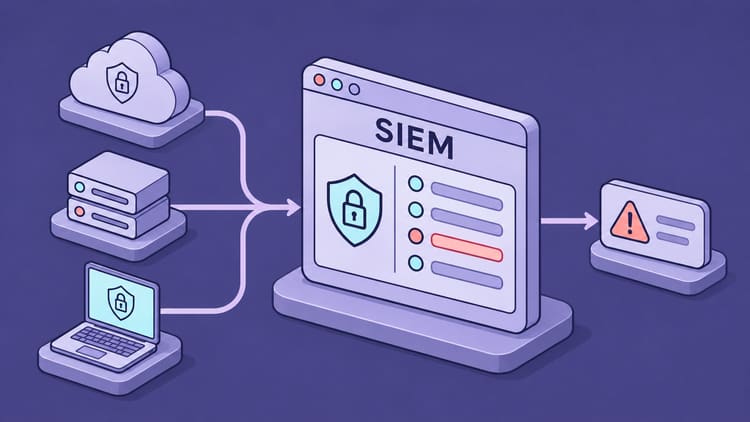
SIEM stands for Security Information and Event Management. It describes a platform that collects, prepares, stores and analyses security events from different sources. Those sources can include Windows and Linux systems, firewalls, identity services, cloud applications and endpoint protection products.
A log starts as a record: an account signed in, a service started or a connection was blocked. A SIEM can generate an alert when a rule or analytical method identifies something suspicious. Further assessment is needed before calling it a confirmed security incident. Keeping these stages separate prevents every red dashboard indicator from being treated as a successful attack.
The original idea combines historical security information management with timely monitoring of new events. Depending on the product, today’s platforms also include behavioural analytics, case management and automation. The category name alone therefore tells you little about which tasks a particular product covers completely.
How separate logs become a connected story
The process begins with collection. An agent on a server can send events to the platform. A firewall supplies syslog messages, while a cloud service exposes data through an API. The SIEM then needs to understand these formats and extract fields such as user, device, source address, action and timestamp. This is parsing; mapping the results into a common schema is normalisation.
Events can then be connected through shared attributes and time windows. This is correlation. A rule might detect several failed sign-ins followed by a successful sign-in for the same account. Connecting those events to later server activity requires suitable identity or device information and an appropriate rule. Collecting the logs alone does not create that detection.

The sources also determine how quickly this works. A platform cannot analyse an event before a cloud API makes it available. An incorrect timestamp can break an otherwise connected sequence. Reliable collection and synchronised clocks are part of detection quality.
Who granted the account extra privileges?
Suppose the accountant in our example works for a business with 50 employees. Its IT team has configured a rule that flags an account added to a privileged group shortly after a sign-in from an unfamiliar device. The alert identifies the account, the device and the group. The subsequent file access is a lead the team can now investigate.
My first question would be who granted privileges to whom. The directory record names two accounts. One made the change and the other was added to the group. The administrator checks for an approved maintenance request and contacts the accountant through a known channel to ask about the sign-in. On the file server, the administrator looks for access by the affected account from 02:13 onwards. That search depends on access auditing having been enabled on the share at the time. Without those records, which files the account opened remains an open question.
If the accountant does not recognise the sign-in and IT confirms misuse, the administrator responsible can disable the account, revoke active sessions and reverse the group change. The case record should distinguish confirmed access from gaps in the evidence.
What does it achieve in daily operation?
For me, the main benefit is a shared view. Investigating an incident involves less switching between consoles and more focused searches for an account, address or device. Historical records can help establish when an incident began and how far it reached. This can accelerate an investigation, provided the required data was collected and remains available.
A SIEM can also perform recurring checks for unexpected administrator changes, suspicious sign-in attempts or security configuration changes. Good rules reduce the number of events people must inspect individually. Poorly tuned rules create alert fatigue. An alert with context, an assigned owner and a next action is much more useful than a hundred unexplained warnings.
A central history can also support audits and evidence gathering. A dashboard or compliance report does not replace an implemented security control or validation of the evidence trail. Retention, access permissions and protection against modification must fit the purpose.
SIEM, EDR, XDR, SOAR and MDR: Who does what?
These categories increasingly overlap. Separating their tasks is still useful when choosing a platform.
| Term | Task | Practical question |
|---|---|---|
| SIEM | Centrally analyse, search and reconstruct events | Which activities are connected? |
| EDR (Endpoint Detection and Response) | Investigate endpoint behaviour and respond on endpoints | What did this process do on the laptop? |
| XDR (Extended Detection and Response) | Connect detection and response across security domains | How do endpoint, identity and network signals relate? |
| SOAR (Security Orchestration, Automation and Response) | Orchestrate workflows and responses through connected tools | Which steps may run automatically? |
| MDR (Managed Detection and Response) | A service team performs agreed detection and response work | Who investigates the alert at night? |
A product can contain several of these capabilities. Buying a SIEM does not automatically provide a security team staffed around the clock. Automated blocking also needs a specific integration, suitable permissions and a tested workflow. A platform alone does not solve staffing.
Wazuh and Sophos compared directly
A fair comparison places self-managed Wazuh alongside Sophos XDR or MDR including the SIEM add-on. Otherwise, it compares a platform with an extension. Wazuh Cloud or a separate Wazuh service provider changes the division of operational responsibilities.
| Criterion | Self-managed Wazuh | Sophos XDR / MDR with Next-Gen SIEM |
|---|---|---|
| Operating model | Own infrastructure and platform maintenance | Vendor-operated platform |
| Licensing and cost | Free software; infrastructure, staff and optional support cost extra | Commercial base product plus add-on and, where required, extended retention |
| Data control | Design storage location and retention yourself | Check vendor architecture and contractual options |
| Customisation | Custom decoders, rules and integrations | Supported integrations plus custom parsers and rules within the platform |
| History | Plan archiving, indexing and capacity | Documented retention; check collectors and licence limits |
| Response | Configure Active Response and additional integrations | Base platform capabilities; contracted service added with MDR |
| Staffing | Organise platform operation and security analysis | Less self-managed infrastructure; own analysis with XDR, contracted scope with MDR |
| Natural fit | Control, learning and existing operational expertise | Existing XDR/MDR use and a need for integrated history and evidence |
Wazuh: Extensive control, with responsibility for operation
Wazuh is a free, open-source security platform with SIEM and XDR capabilities. Its functions include log analysis, file integrity monitoring, configuration assessment and vulnerability detection. You can run the platform yourself; Wazuh also offers a commercial cloud service and support.
Its central architecture consists of the Wazuh server, indexer and dashboard. Agents supply data from monitored devices, while other sources can connect through methods such as syslog. The server processes data using decoders and rules, the indexer makes stored information searchable, and the dashboard presents it.

The attraction for me is the freedom to shape the system. With a self-managed deployment, I can choose storage, infrastructure and customisations. Custom decoders and rules are useful for applications with unusual log formats. This flexibility matters particularly when a team wants to understand and influence how a detection works.
It requires time and expertise. Updates, certificates, agent deployment, permissions, backups and storage planning remain the operator’s responsibilities. Each new source needs checks that important fields are extracted correctly and produce useful alerts. Open source lowers the licensing barrier; it does not eliminate labour costs.
One important detail: Wazuh does not archive every received raw event by default. Full archiving must be enabled. Searching those records in the dashboard also requires forwarding them to the indexer and configuring the appropriate index. If you want to investigate events that did not trigger an alert at the time, plan that storage in advance. It increases storage requirements.
Active Response also supports configured actions following detected events. What works depends on the script, target system and rules. This does not establish general equivalence with every endpoint isolation or response feature offered by another product.
Sophos Next-Gen SIEM: Extending an existing security platform
The precise product name matters here. According to current administration documentation, Next-Gen SIEM is an add-on for Sophos XDR Powered by Secureworks or Sophos MDR. You cannot buy it as a standalone SIEM. XDR remains the platform for detection, investigation and response; the SIEM add-on primarily expands retention, data ingestion and compliance reporting.

The practical benefit can be a shared workflow. Organisations already using Sophos XDR or MDR can use historical records and additional sources there for investigations and evidence. They do not need to build a separate self-managed SIEM infrastructure for that purpose. Sophos also supports third-party sources; the approach is not limited to Sophos devices.
The trade-off is dependence on the platform and its licensing model. An existing Sophos firewall contract alone does not include this SIEM add-on. Check actual data sources, available fields, export options and response permissions for your environment. Even with a cloud platform, source maintenance, operational decisions and coverage checks remain with the organisation or its appointed provider.
Read retention terms and licence limits carefully
The administration documentation specifies 13 months of standard retention, with paid extensions up to ten years. It also warns that legacy syslog collectors do not support the complete retention capabilities. An existing collector is therefore insufficient evidence that the intended history is being captured fully.
Sophos promotes pricing per user and server without ingestion-based fees. However, its licensing guidelines list a Next-Gen SIEM allowance of 1 GB of raw data ingestion per day, aggregated across all data sources. SIEM subscription quantities must match the licensed XDR and MDR users and servers.
For a specific deployment, I would put two figures side by side. How many GB per day does the quote cover across all licensed users and servers? How many GB do the intended sources send on a busy day? If measured volume is higher, ask the provider what happens to the excess events. That answer matters as much to a future investigation as the price does to the budget.
What other systems are available?
Wazuh and Sophos suit different starting points. I would also consider the following approaches when building a shortlist, without treating this as a complete market survey.
| Solution | Approach and advantage | What I would check |
|---|---|---|
| OpenSearch Security Analytics | SIEM capabilities on an open search and analytics platform; useful for custom data pipelines | The Security Analytics project uses Apache 2.0. Collection, operation and suitable detections still need to work together. |
| Security Onion | Combines network monitoring, log analysis and investigation, among other capabilities; useful for deeper network visibility | Plan sensor placement and data volumes. The distribution includes ELv2 components and does not consist entirely of software under conventional open-source licences. |
| Microsoft Sentinel | Cloud SIEM with Microsoft and third-party integrations; a natural candidate in Microsoft-heavy environments | Check ingestion, retention, automation and ongoing costs for your actual sources. |
| Elastic Security | Combines search, SIEM and other security capabilities; interesting where Elastic expertise already exists | Check the deployment model, feature tier and licensing of the required components. |
| Splunk Enterprise Security | Commercial SIEM with extensive analytics and integration capabilities | Budget realistically for the platform and security content. |
Security Onion’s licensing documentation deserves particular attention: free to use, source available and unrestricted reuse as a hosted service are different properties. With Elastic, I would similarly check the specific distribution and feature tier rather than label the entire product family free or open source.
What I would check before deployment
I would start with a few clear detection goals: unexpected administrator privileges, suspicious sign-ins and changes to critical servers. These determine the required sources. I would then generate harmless test events and verify the complete path: was the event created, did it arrive, were its fields correct, did the rule trigger and did the notification reach the responsible person?
Acceptance testing should also cover a failed data source. A platform should not quietly look healthy while an important source has stopped sending events for days. Source-loss alerts, controlled test alerts and regular rule reviews belong in ongoing operation.
For cost planning, I would measure data volumes and investigation effort during a pilot. Ten GB of raw logs per day already totals roughly 3.65 TB per year, before extra index data, replicas and backups. Compression and storage tiers change the actual requirement. This example is not a sizing recommendation for either Wazuh or Sophos.
Logs also often contain usernames, IP addresses and activity records. I would define the required fields, storage location, access and deletion policy. The platform itself needs protected administrative access, updates and verifiable backups. Bringing security information together creates a system that needs corresponding protection.
My conclusion
For the business in the example, I would start with one question. Who picks up the alert at two in the morning? If the team has on-call cover, knows its systems and wants to integrate its own applications, I would pilot Wazuh. I would record an ordinary file access that triggers no alert and look for it a week later. That is a practical test of whether the archive will support an investigation.
If the business already uses Sophos XDR or MDR and needs to produce access records a year later, I would assess the SIEM add-on first. During the pilot I would trace an access on the company’s own file share through to a searchable event. The quote should specify the retention period and daily data allowance.
If nobody is available to investigate overnight, my first priority would be an on-call arrangement or an MDR agreement. That agreement should name who has authority to disable an affected account immediately.
Until next time,
Joe
Sources
This comparison covers documented capabilities. Initial research was completed on 27 October 2026. Wazuh archiving and Sophos licensing and retention were checked again on 20 November.