TRMNL X Review: E Ink Is Ready for the Living Room
Apps Personal SecurityTable of Contents
I have been looking for a good information screen for years. I do not want another tablet distracting me with notifications or a television mounted on the wall. I want a calm surface that shows me the information that matters at a glance: my calendar, the weather, tasks, a few metrics, and perhaps the status of my most important security systems in the office.
My first serious attempt was a Raspberry Pi connected to a display. It worked technically, but in practice it suffered from exactly the problems that are hard to avoid with conventional screens. The display stayed illuminated, consumed power, and felt like an active device even when nobody was looking at it. Instead of an information board, I had another small computer that needed care.
That is why E Ink fascinated me early on. It looks more like printed paper than a glowing screen. Once an image has been drawn, it remains visible without the panel continuously consuming energy. Power is mainly required when the device wakes up, retrieves data over Wi-Fi, and refreshes the display. That is an excellent fit for an information screen that does not need to redraw itself every second.
The obstacle has always been price. Large E Ink panels were extremely expensive a few years ago, and to a significant degree they still are. Small panels are affordable. At 13 inches the price rises considerably, and anyone looking at 25, 27, or 32 inches quickly enters four-figure territory. Complete large color devices and professional signage products costing around $2,500 are not unusual.
Then came TRMNL, pronounced Terminal.
TRMNL is the best information screen I have owned so far, yet it is still not the information screen I ultimately want.
Four months promised, almost nine months of waiting
TRMNL had been on my radar for a long time before I finally ordered one. The estimated delivery time was about four months. In the end, I waited almost nine.
Despite the considerable delay, there was no radio silence for months. The founder regularly shared updates in newsletters and videos, explaining why shipping had slipped, where supply problems had occurred, and which parts had not yet met his quality standards. Instead of vague requests for patience, he made it clear what was holding things up and what still had to happen. That did not shorten the wait, of course, but I found the transparency both credible and likable. I did not always know when my TRMNL would arrive, but at least I knew why it had not shipped yet.
I can think of few technology products that made me wait this long after ordering. My Tesla Model Y was another test of patience, although two or three years passed between wanting it and taking delivery. Every additional month feels slightly more absurd with a small E Ink display. You order a relatively simple device and eventually begin to wonder whether it will arrive at all.
When the package finally reached my home, it felt like a small birth. That may sound dramatic for a 10.3-inch display, but after nine months, unboxing it was more than the usual start with a new gadget.
I bought the device myself. This article is not sponsored and contains no affiliate links. My everyday experience relates to the new 10.3-inch TRMNL X. I ordered the larger battery configuration, giving it 12,000 mAh instead of 6,000 mAh. I checked the current state of the open firmware, framework, plugins, and self-hosting options against the manufacturer’s documentation and public repositories on August 28, 2026.
What TRMNL actually is
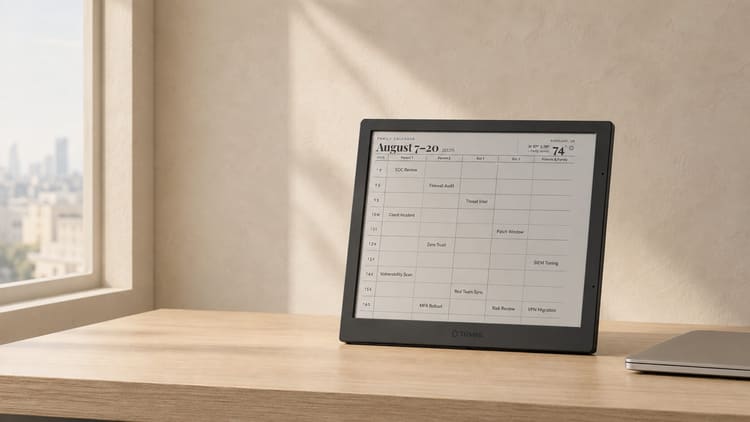
The hardware is deliberately understated. Its 10.3-inch E Paper panel has a resolution of 1,872 × 1,404 pixels, reaches 227 ppi, and displays 16 shades of gray, equivalent to 4 bits per pixel. There is no logo on the front. That suits a device intended to look more like a quiet picture frame than an advertised gadget.
The screwed enclosure can be opened and is explicitly designed to be mod-friendly. The X measures 233 × 193 × 12 millimeters. TRMNL lists a weight of 365 grams with one battery and 450 grams with the two batteries in my configuration. The company is aiming for IP65, but according to the current specification, certification is still pending. The same applies to several other marks, including FCC, CE, and RoHS. Despite the enclosure’s intended dust and water resistance, I would not yet treat it like a certified device.
Charging works through USB-C or the magnetic dock. TRMNL lists a stand, wall mount, and integrated magnet for placement and mounting. The dock uses pogo pins for power and accessories and can also perform a hard reset.
This is an important difference from a tablet. TRMNL does not keep a website open permanently, nor does it run twenty apps in the background. The server prepares the content as an image. The device retrieves that image, draws it on the panel, and returns to a low-power state. The configured refresh interval therefore has a major effect on battery life.
For typical use, the manufacturer quotes approximately three to six months of battery life for the X. The device supports one or two automatically detected 6,000 mAh LiPo batteries. My configuration therefore contains 12,000 mAh. Such estimates always depend on Wi-Fi reception, image content, and refresh frequency. The default interval is 15 minutes and can be changed. What matters to me is not whether the final result is exactly three, four, or six months. What matters is that I do not need to route a power cable to its location or charge it every evening.
There is no conventional touchscreen, permanently open connection, or app interface on the display. Instead, the X has a gesture bar and a Bosch accelerometer that detects portrait and landscape orientation, among other things. Configuration still takes place in the web dashboard.
This reduction is not a missing feature. It is the essence of the product.
What happens technically during a refresh
The TRMNL X is not a miniature Linux system, much less a browser inside a picture frame. Its main processor is an ESP32-S3 with 16 MB of flash and 8 MB of PSRAM. The public firmware project confirms this configuration with the esp32s3_n16r8 build profile. That is enough for Wi-Fi, TLS, PNG decoding, display control, and firmware updates. A modern JavaScript web app with several tabs and local rendering would be completely out of place on this hardware.
What an ESP32 controller actually is
An ESP32 is a microcontroller. A small chip combines processor cores, memory, flash storage, and interfaces for Wi-Fi, sensors, and other electronics. It runs firmware written for one specific device. There is no full desktop operating system, normal browser, or permanent collection of background services. After startup, the chip performs a clearly defined task and can then enter an extremely low-power sleep state.
A Raspberry Pi, by contrast, is a single-board computer. It provides much more computing power and can boot Linux, run a browser, host databases, and render content locally. That flexibility was useful for my earlier information screen, but it also brings the usual baggage of a computer. The operating system must boot, processes and network services continue running, updates need to be installed, and the SD card or file system can be damaged by an unclean shutdown.
TRMNL would leave most of that additional performance unused. It does not need to calculate a web page or assemble a calendar locally. The server handles rendering, plugins, and scheduling. The ESP32 only wakes up, connects to Wi-Fi, downloads a finished image, transfers it to the E Paper panel, and returns to deep sleep. The active window is short and idle power consumption is very low. That is precisely what makes months of battery life possible instead of requiring a permanently connected power supply.
Startup time and maintenance also favor the microcontroller. An ESP32 can begin executing its firmware almost immediately after waking, while a Raspberry Pi first has to load Linux and its services. Its attack and failure surface is smaller as well because there is no general-purpose Linux installation with numerous packages to maintain. A Raspberry Pi is the better choice when content must be rendered on the device, complex applications must run locally, or several services are required. For an E Paper client with one well-defined task, the ESP32 is the better tool.
An additional ESP32-C5 acts as a modem for 5 GHz Wi-Fi and uses an external antenna. The ESP32-S3’s 2.4 GHz Wi-Fi remains available as a fallback. According to the data sheet, the device supports 802.11 b/g/n/ac and BLE. It also includes a temperature sensor alongside the accelerometer and gesture sensor. A Qwiic connector supports custom extensions. Through USB OTG, the X can provide dock accessories with 5 volts at up to 1.2 amps. These interfaces are unnecessary for normal dashboard use, but they make custom sensors, accessories, and hardware modifications much more interesting.
TRMNL therefore moves the demanding work to the server. A complete update cycle looks roughly like this:
- A timer wakes the controller from deep sleep.
- The device joins a known Wi-Fi network and calls the display endpoint on the configured server.
- The request includes the device ID or MAC address, an access key, and operating data such as firmware version, battery voltage, and Wi-Fi signal strength.
- Based on the playlist, schedule, and conditions, the server decides which plugin content should appear next.
- Data from calendars, APIs, webhooks, or other plugins is inserted into an E Paper-friendly layout with Liquid and the TRMNL Framework. The server renders a PNG at the resolution and color depth of the selected device model.
- The display downloads the image, writes it to the E Paper panel using the appropriate panel and temperature profile, and then returns to sleep.
The server response is small. It does not contain the entire calendar or an HTML document that still needs to run on the device. In simplified form, it looks like this:
{
  "status": 0,
  "image_url": "https://server.example/screens/next.png",
  "filename": "calendar-2026-08-26T08-30-00Z",
  "refresh_rate": 1800,
  "update_firmware": false,
  "reset_firmware": false
}
In this example, refresh_rate: 1800 means the next request should occur after 1,800 seconds, or 30 minutes. The same response path can trigger an OTA update through update_firmware and an additional firmware URL. A custom server essentially has to reproduce only a few stable endpoints, especially setup, display, and logs.
In the TRMNL cloud, every device has its own API key, which the client sends as an access-token. A request to /api/display advances the playlist to the next eligible item on the server. Two devices should therefore not accidentally share the same key, or they will alternately retrieve different playlist entries. TRMNL provides a separate endpoint for mirroring the currently rendered screen. This detail shows how closely device identity, playlist state, and access keys are connected in the cloud model.
This separation explains several product characteristics. The client remains small, energy-efficient, and comparatively easy to port to other hardware. Layouts look identical on equivalent devices because the result is already an image. At the same time, complexity moves to the server, where plugins must run, data sources must be queried, images rendered, playlists scheduled, and devices managed.
Why the battery lasts months instead of hours
E Paper is bistable. In simplified terms, its black and white pigments remain in position after an electric field has moved them. The panel therefore needs no continuous energy to keep an existing image visible. Changing the image consumes energy, and Wi-Fi consumes even more.
Without disciplined deep sleep, battery life would collapse despite the large battery. The real optimization is not just the E Paper panel but the shortest possible active window: start the controller, connect to Wi-Fi, establish TLS, download the image, refresh the panel, and return to sleep.
A Texas Instruments battery-management chip measures more than a rough voltage. It tracks state of charge, state of health, and battery capacity. This is particularly useful with two automatically detected 6,000 mAh packs and more accurate than estimating a percentage from current voltage alone.
Small settings therefore make a large difference. A five-minute refresh wakes the radio six times as often as a 30-minute refresh. Poor Wi-Fi reception lengthens connection time. Large or heavily dithered images require more data and decoding time. Calendars and status screens with broad solid areas are almost ideal for this architecture.
The current display specification quotes approximately 200 milliseconds to 1.3 seconds, depending on refresh type. A complete image change remains visible as the characteristic E Paper flash, but it does not take long. Partial updates can change individual regions faster without redrawing the entire surface.
Setup is pleasantly boring
When first switched on, TRMNL creates a Wi-Fi network for setup. You connect to it, enter your Wi-Fi credentials, and link the device to your TRMNL account. After that, you build a playlist in the browser.
The concept resembles a music service, except information screens rotate instead of songs. A calendar can appear more often in the morning, a task list during working hours, and a photo in the evening. Content can be scheduled, and up to four data sources can share one page as a mashup.
This is where a small E Ink panel becomes a useful product. Hardware alone would be no more than an attractive battery-powered frame. The web dashboard and plugins determine whether it ends up in a drawer after two weeks or becomes part of daily life.
I mainly use TRMNL for my calendar. It is an excellent use case because appointments do not require second-by-second updates. I can see what is next while walking past without unlocking my phone or finding a calendar tab. Weather, tasks, photos, analytics, and other information work in the same way.
A good TRMNL screen answers one question within a few seconds. If I have to stop, scroll, or study a legend, I have put too much information on it.
The plugin ecosystem is the real strength
When I ordered my TRMNL, there were around 450 plugins and integrations. More appeared throughout the long wait. There are now well over 1,000, and the current X specification lists at least 1,231 prebuilt integrations. They cover calendars, weather services, task lists, photos, financial data, YouTube Analytics, smart-home information, and numerous community projects.
To me, that development says almost more than the number itself. For nine months I watched new recipes, integrations, and ideas arrive before my device had even shipped. TRMNL is clearly not just a manufacturer maintaining a few predetermined functions. A very active community continually expands the system and demonstrates how differently a quiet E Ink display can be used.

See for yourself whether the TRMNL integrations directory contains something useful for you.
Not every plugin is useful to everyone, and a large number says nothing by itself about quality. Even so, the breadth of the offering changes the product. I do not have to build a custom application for every simple display. I can start with existing plugins, combine several views in a playlist, and develop something myself only where my requirements become more specific.
The system is open enough to make custom plugins comparatively easy. A Private Plugin can periodically fetch data from an HTTPS URL, usually as JSON. Its layout is described with HTML, CSS, and Liquid variables. The markup editor offers a live preview and, when needed, custom CSS and JavaScript. TRMNL turns that into the image shown on the device.
What the TRMNL Framework does during rendering
The TRMNL Framework is more than a collection of attractive CSS classes. It defines screens, views, layouts, title bars, columns, and mashups, plus components for tables, charts, progress indicators, images, and typography. This matters because an E Paper layout cannot scroll or react to user input after rendering. Overflowing text has to be shortened, resized, or restricted to a sensible number of lines before the image is produced.
Framework 3.1 was an important step for the TRMNL X. It introduced a CSS-variable color architecture, additional gray levels, high-resolution rendering modes, and responsive utility classes. Plugins can react to device size, portrait or landscape orientation, and color depth. A prefix such as lg: refers to the target device’s size class rather than merely the current browser width. The 4bit: prefix can specifically address the X’s 16-level grayscale mode.
That does not make the monochrome X display color. Semantic roles such as success, warning, and error are mapped to the palette the target device actually supports. Existing plugins continue to work, while larger type scales, container queries, intelligent column wrapping, and portrait-specific rules can use the X’s larger area much more effectively.
Before the screenshot is taken, a JavaScript-based Framework Runtime Pass measures the finished screen, handles overflow, truncates text, fits values into the available space, and aligns fonts precisely to pixels. Custom plugin JavaScript therefore runs in the rendering environment before the PNG is created. It does not run as a web app on the ESP32. This separation allows flexible layouts without adding a browser to the low-power client.
The linked 3.1 documentation is no longer the newest version. At the time of this review, TRMNL lists Framework 3.3. It adds themes, a TRMNLPaint interface for JavaScript, and charts, maps, and icons adapted to devices and themes. The core idea remains unchanged: plugin authors describe information once, and the framework adapts its presentation to the target device’s capabilities.
The TRMNL developer section also extends beyond individual plugins. In addition to the normal REST API, a partner API supports preconfigured devices, automatic provisioning, and fleet management. A provider can ship its own application with an assigned plugin and prepared onboarding. This is irrelevant to my personal calendar, but for corporate status displays it turns one gadget into a potentially scalable platform.
A deliberately limited API for a personal security dashboard might return only this status:
{
  "checked_at": "2026-08-26 08:30",
  "critical_incidents": 0,
  "open_incidents": 2,
  "vpn_status": "ok",
  "backup_age_hours": 9
}
The fields are then inserted into the markup with Liquid:
<div class="layout">
  <div class="columns">
    <div class="column">
      <span class="title">Security Status</span>
      <span class="value">{{ critical_incidents }}</span>
      <span class="label">critical incidents</span>
    </div>
    <div class="column">
      <span class="title">VPN</span>
      <span class="value">{{ vpn_status }}</span>
      <span class="label">Backup {{ backup_age_hours }} hours ago</span>
    </div>
  </div>
</div>
The example is intentionally simple. You need neither a full frontend stack nor a native app or permanent process on the display. Anyone who already has an API or a small script returning clean JSON can create a useful screen quickly.
The word plugin covers several models. Native Plugins are maintained by TRMNL and integrate services such as Google Calendar or Shopify. A Private Plugin belongs to one account and receives data through polling, webhooks, or other plugin instances. A published Recipe is essentially an approved Private Plugin that others can install with one click or fork. Installed recipes receive later improvements automatically. A fork can be changed freely but stops synchronizing with the original. The Screenshot Plugin periodically renders an existing web page. A Third-Party Plugin combines an external application with a simplified OAuth2 flow, leaving operation, authentication, and personal-data handling with the provider.
I would begin my security dashboard with a Private Plugin. The server can fetch JSON, RSS, XML, CSV, or plain text, optionally with custom HTTP headers. Alternatively, an internal process can push already aggregated values to TRMNL through a webhook. That is usually cleaner than granting an external poller direct access to an internal monitoring system.
The direction of data flow matters. When the TRMNL cloud polls, the endpoint must be publicly reachable or exposed through a controlled intermediary, and API keys reside in the platform’s plugin configuration. With a webhook, my system actively sends the data to TRMNL. With BYOS, the entire process can remain inside my network. The same attractive display can therefore represent very different security architectures depending on the operating model.
The challenge is less the code than the selection. The X’s 1,872 × 1,404 pixels provide far more space than the OG, but the physical surface is still only 10.3 inches. Every additional metric remains a choice against readability from a distance. I would not try to reproduce a SIEM inside a picture frame. A few instantly understandable states are better: Is there a critical incident? Are the backup and VPN healthy? When was the data last checked?
A security dashboard is not an alerting system
TRMNL suits my wish to keep certain security information proactively visible in the office, but there is an important limit. It retrieves content at intervals, has no permanent push connection, and is not supposed to have one. TRMNL is therefore an overview, not a dependable alerting channel.
A critical incident still requires push, email, pager, or another actively monitored channel. The E Ink screen can show the general state and may help me notice an unusual metric earlier. I must not rely on the next refresh arriving quickly enough or on my looking in the right direction.
I would also reduce the displayed data strictly. A freely visible screen should not show usernames, internal IP addresses, customer data, confidential ticket details, or API keys. It should receive only aggregated values. The backend may read sensitive sources, but the endpoint intended for TRMNL should turn them into minimal screen-specific information.
The architecture helps. The device initiates the connection and pulls its next screen from the server. It does not have to be reachable from the internet, which reduces its inbound attack surface without making the complete system risk-free. Anyone using the TRMNL cloud entrusts the platform with connected data sources and rendered content. Those needing more control can run their own server.
How open source is TRMNL really?
Hardware products often advertise open source even when the only public code is an old kernel fork or a poorly documented repository. With TRMNL, it is worth separating the layers.
The device firmware is available under GPL-3.0. It covers Wi-Fi setup, server communication, OTA updates, PNG decoding, panel control, temperature profiles, grayscale, and deep sleep. You can inspect, modify, compile, and flash it onto supported ESP32 hardware. The repository has distinct build targets for the OG and X. TRMNL warns that the main branch develops continuously and may contain breaking changes. Tagged releases or the official Flash Assistant are safer for a production device than an arbitrary main snapshot.
The TRMNL Framework for E Paper layouts is also public and MIT-licensed. It includes Sass sources, design tokens, dithering patterns, the JavaScript runtime, documentation site, and release tooling. MIT applies to the framework code itself. Fonts and some image resources have their own licenses, while Highcharts is loaded externally for certain examples and is not covered by the repository’s MIT license. A complete fork must assess those dependencies separately.
The TRMNL organization on GitHub now contains much more than firmware and a sample server. At the time of my review, it listed 53 public repositories. They include several BYOS servers, Liquid extensions, a local plugin development server, translations, OAuth templates, API libraries, alternative Kindle, Kobo, Android, and Raspberry Pi clients, and printable mounts. Not every project comes solely from the core team, but the public ecosystem is far broader than one token repository.
Several open implementations support Bring Your Own Server. Terminus is the official flagship, is MIT-licensed, and is actively maintained, but remains a pre-1.0 beta. Alternatives use PHP/Laravel, Node.js, Next.js, TypeScript, Python with FastAPI or Django, and Elixir/Phoenix. The developer site marks some as active and others as inactive. The existence of a repository alone does not guarantee feature coverage, long-term maintenance, or seamless compatibility.
Not everything is open today. TRMNL’s hosted Core web application remains a commercial service and has not been published in full. Open firmware does not make a finished product completely open hardware either. The enclosure, manufacturing, quality control, and commercial device remain services provided by the company.
This is where the Unbrickable Pledge applies. TRMNL has publicly stated its intention to release the Core web application’s source code if the company becomes insolvent. That is a welcome promise and has been preserved by the Wayback Machine, but it is not source-code escrow triggered automatically by a contract. I regard it as a credible intention rather than a legally guaranteed life insurance policy.
The more important practical protection already exists. Open firmware and working BYOS servers mean I do not need to wait for the commercial Core to be released before operating the display independently.
Four operating models you should distinguish
The abbreviations sound unnecessarily similar, but they describe four clearly different approaches:
| Hardware | Server | TRMNL term | Cost paid to TRMNL | Typical user |
|---|---|---|---|---|
| TRMNL device | TRMNL Cloud | Standard | Device price | The simplest setup with no server operation |
| Custom hardware | TRMNL Cloud | BYOD | BYOD license | A custom display with TRMNL plugins and dashboard |
| TRMNL device | Custom server | BYOS | No additional license | Original hardware with local data storage |
| Custom hardware | Custom server | BYOD/S | No license | Maximum control over hardware, firmware, and data |
The standard route is the finished device. You pay once for the OG or X and use the hosted platform without a mandatory annual subscription. It is the most convenient option because TRMNL operates rendering, plugins, playlists, OAuth integrations, and updates.
With BYOD, or Bring Your Own Device, only the hardware comes from another manufacturer or your own build. The open TRMNL firmware or a compatible client still calls the TRMNL cloud. This currently requires a BYOD license, which also includes developer features, so Developer Edition does not have to be purchased separately.
With BYOS, or Bring Your Own Server, the TRMNL hardware remains but points to a server on your LAN or in your cloud. TRMNL charges no additional license for this change. Crucially, BYOS bypasses TRMNL’s hosted plugin stack. Native cloud integrations do not automatically move to your server. The selected implementation must support or reproduce the necessary data sources, playlists, and rendering functions. Even so, this is the most interesting compromise for me: efficient finished hardware with control over data sources, rendering, and operating life.
BYOD/S combines both. The display is self-built or reused, and the server is self-hosted. The entire chain can work without payment to or operational dependence on TRMNL. Free does not mean effortless. Someone must maintain firmware, server, database, backups, updates, and compatibility.
What TRMNL and the alternatives actually cost
As of August 28, 2026, the TRMNL OG costs $139 and the larger TRMNL X costs $229. The larger battery costs an additional $10 for either model. On the X, it doubles capacity from 6,000 to 12,000 mAh. Optional developer access normally costs a one-time $20 and unlocks custom plugin development and API access.
For a self-built or reused device, the BYOD license costs $50. TRMNL describes it as a perpetual one-time license for exactly one device. Multiple BYOD devices require multiple licenses but can be managed through the same account. BYOS does not require this license.
The TRMNL 7.5-inch DIY Kit, developed with Seeed Studio, currently costs $47.99. It contains an 800 × 480 E Ink panel, XIAO ESP32-S3 Plus, 2,000 mAh battery, and connecting cable. A finished enclosure is not included. Adding the $50 BYOD license brings the price to $97.99 before shipping, tax, and an enclosure. With your own server, only the hardware costs money, but you pay in time.
| Option | Approximate entry price | What is missing or additional |
|---|---|---|
| TRMNL OG | $139 | Optional developer access and larger battery |
| TRMNL X | $229 | Optional developer access, choice of 6,000 or 12,000 mAh |
| Seeed DIY Kit with TRMNL Cloud | $97.99 | Enclosure, assembly, shipping, and tax |
| Seeed DIY Kit with BYOS | $47.99 | Enclosure, custom server, and operation |
| Existing Kindle, Kobo, or Android screen | $0 to $50 | Depending on device, jailbreak or client and perhaps a BYOD license |
| Custom server | Software from $0 | Compute, storage, backups, updates, and working time |
This also makes the business model easier to understand. TRMNL earns money from finished hardware, developer features, and third-party devices using its platform. Anyone who does not want the hosted infrastructure may bypass it completely. That is far fairer than a model where open firmware is merely marketing while all useful operation remains tied to a subscription.
BYOD is more than a cheap imitation
The most obvious DIY approach combines an ESP32 with a compatible E Paper panel. The Seeed kit removes the need to select a controller, driver board, battery, and cables. You still assemble the parts, flash firmware, configure Wi-Fi, and build or print an enclosure. Economically, the saving compared with the OG is smaller than the kit price suggests. For enthusiasts, the real value lies in understanding and changing the complete chain.
TRMNL can also reuse existing devices. Clients or instructions exist for Raspberry Pi, Kindle, Kobo, Android tablets, and other displays. Even a discontinued Meta Portal can become a TRMNL client. That is environmentally attractive because working hardware does not have to be discarded merely because its original service was shut down.
These variants do not automatically offer the same experience. A Raspberry Pi consumes more power than an ESP32 and usually runs continuously. An LCD tablet still glows, losing the main benefit of my E Ink setup. A Kindle can be an excellent E Paper client but may require a jailbreak and compatible software version. A supported ESP32 panel comes closest to the original concept.
Display parameters must match as well. Firmware and server need to know the model’s resolution, rotation, color depth, and palette. The OG uses 800 × 480 pixels with up to four gray levels, while the X uses 1,872 × 1,404 with 16. A 7.3-inch Spectra 6 panel needs a different driver and refresh logic than a monochrome 7.5-inch panel. BYOD does not mean every E Ink surface will work perfectly after one firmware flash.
I still like this technical openness. The manufacturer actively helps connect cheaper or existing hardware to the same platform. That may cannibalize sales of its own device, but it makes the ecosystem more valuable in the long term.
What self-hosting means in practice
On a product page, BYOS can sound like one Docker container and five minutes of work. Terminus involves more. It uses Ruby and Hanami, PostgreSQL, Sidekiq, Valkey, Puma, ImageMagick, and its own rendering and job workflow. Docker is supported, as are installations on Raspberry Pi or Kubernetes. At the time of writing, Terminus still calls itself a beta and has not reached version 1.0.
That is not a reason to avoid it, but it is a reason not to confuse self-hosting with freedom from maintenance. Firmware and server share a protocol. If setup, display, or log endpoints change, both sides must remain compatible. The database, uploads, user accounts, background jobs, and backups become your responsibility.
A lighter community implementation may suit simpler requirements. Someone who needs only a fixed playlist and a few custom screens may not need a complete Core clone. Those expecting multiple devices, users, sensors, plugins, previews, and automatic firmware management will benefit more from the larger Terminus stack.
BYOS would be particularly appealing for my security dashboard. A local server could fetch data directly from internal APIs, render a deliberately sanitized display, and deliver it to the screen. No monitoring endpoint would need to be public, and no sensitive credentials would be stored in an external plugin configuration. In return, I would have to patch, monitor, and secure the server like any other internal application.
Why the ecosystem can work economically
Developers can now publish plugins as recipes or third-party plugins. Since November 2025, TRMNL has rewarded contributions through a Creator Fund. Plugin authors are not the only beneficiaries. Translators and contributors of firmware code, mounts, or other ecosystem components can participate as well.
This is not charity. It is a useful cycle. More good plugins make the platform more attractive. More people buy hardware, Developer Edition, or BYOD access. A portion of revenue returns to those who increase the platform’s value.
That is why I find the model more interesting than a conventional hardware subscription. TRMNL charges where real costs or added value exist while leaving a technically complete exit open. The company earns money because users want to stay, not because they are technically unable to leave.
Fast refreshes and room for hardware hacks
E Paper has a characteristic quirk: the panel briefly flashes during a full refresh. That is technically unavoidable and no major issue for a device that updates only every few minutes. Depending on the refresh method, the X’s documented update time ranges from approximately 200 milliseconds to 1.3 seconds.
The 16 gray levels visibly improve calendars, shading, charts, and black-and-white photos. Partial refresh is suitable for small changes, while a full refresh rebuilds the panel cleanly. The right choice depends not only on desired speed, but also on how much of the screen changes and how aggressively ghosting should be prevented.
Mechanically, the X is unusually open too. Its enclosure is screwed together and can be opened, the Qwiic connector invites custom extensions, and USB OTG can power accessories through the magnetic pogo-pin dock. Because the firmware is open, such additions do not depend entirely on the manufacturer’s product roadmap.
Why even 10.3 inches is not enough for me
At 10.3 inches, the X is substantially larger and sharper than the original OG. It works very well on a desk or at close range. In a kitchen, where I want to read the family calendar from several meters away, it still feels like an intermediate step. Mashups containing several kinds of information look technically impressive but quickly become too fine at a distance.
I want approximately 13 inches for the kitchen. That would be large enough for a weekly calendar, weather, tasks, and perhaps a short note without making everything feel compromised. For the living room or office, I am thinking even bigger. 27 to 32 inches would transform photos, art, family information, or a security dashboard.
My TRMNL X is a significant step in that direction. Its 4:3 format suits calendars and photos, the high resolution produces fine text at close range, and the unbranded front looks pleasantly neutral. With 12,000 mAh, I do not need to add a permanent charging cable simply because of the larger surface.
For a desk or small wall, the X is the more sensible choice for me. For my kitchen ideal, however, even 10.3 inches remains smaller than I want. It does not solve the size problem. It merely moves the boundary.
Large E Ink surfaces reveal brutal economics. A single monochrome 13.3-inch panel currently costs $449 in E Ink’s official shop, before adding a controller or finished enclosure. A complete 25.3-inch DASUNG monitor costs around $1,548 to $1,649 depending on the version. Large color products can be even more expensive. That explains the prices without making them more attractive for a kitchen or personal dashboard.
Color is another compromise. Black, white, and grayscale go surprisingly far for calendars, text, and status information, but I want more for living-room photos. Color E Paper displays are fascinating, usually look less vivid than LCD or OLED, and raise the price further. My ideal 32-inch color TRMNL may technically exist as a collection of components, but economically it is not yet a normal consumer product.
The limitations are part of the concept
TRMNL is not a tablet replacement. Animation, video, fast scrolling, and direct interaction are not its tasks. Anyone who wants minute-by-minute stock prices or a tappable screen will be happier with a conventional display.
Photos on the X are a stylistic choice as well. With 16 gray levels and high resolution, they can look charming, almost like high-quality newspaper graphics. Gradients, skin tones, and dark scenes are not reproduced faithfully because the panel remains monochrome.
Battery life is not a law of nature either. Short refresh intervals, weak Wi-Fi, and complex images wake the radio and controller more often and lead to earlier charging. That is not a flaw but the normal trade-off between immediacy and calmness.
What bothers me most is still the size, which is almost a compliment to everything else. I am not frustrated by unusable software, complicated setup, or a closed system. I simply want more surface because I already know what I would display on it.
My conclusion after the long wait
Was it worth waiting? Yes, although almost nine months was a very long time for a product originally announced with a four-month lead time.
TRMNL solves my old Raspberry Pi problem elegantly. It does not glow continuously, does not need a permanent power cable at its location, and demands almost no attention in daily use. The calendar is simply there. Other information appears on schedule. If I want more, I can combine plugins or build one myself with manageable effort.
The ecosystem matters even more to me. Open firmware, documented BYOD, several self-hosting projects, a simple plugin model, and an active community are not guaranteed with a small hardware company. They reduce the risk of the device becoming electronic waste simply because a cloud service disappears or the company changes strategy.
I still would not recommend TRMNL blindly to everyone. Even the X I tested is, at 10.3 inches, primarily a personal information screen for short to medium viewing distances. Anyone equipping a kitchen, living room, or office should take reading distance seriously. Even the X is not large enough for my vision, and demanding 13 inches, 25 inches, or color quickly leaves the comfortable price range.
TRMNL is therefore not the final destination for me, but the most convincing intermediate result. It demonstrates how a calm, efficient, and open information screen should work. Now the display industry only needs to make the same idea affordable at 13, 27, or 32 inches.
When that happens, I already know where the devices will hang.
Until next time,
Joe
FAQ
What is TRMNL?
How long does the TRMNL battery last?
Can I develop my own TRMNL plugins?
Can I self-host TRMNL completely?
Is TRMNL completely open source?
How much do TRMNL, Developer Edition, and BYOD cost?
Can I run TRMNL on my own hardware for free?
Is TRMNL suitable as a security dashboard?
Which TRMNL model was tested?
Sources
- TRMNL X Technical Specifications
- TRMNL Developer Platform
- Internet Archive: Original Unbrickable Pledge
- TRMNL Docs: How TRMNL works
- TRMNL Docs: Bring Your Own Device
- TRMNL Help Center: Compare custom plugin types
- TRMNL Help Center: BYOD and Developer Edition licensing
- GitHub: TRMNL organization and public repositories
- GitHub: TRMNL Framework source and license
- DASUNG Paperlike 253 e-ink monitor