Why Omarchy Makes Me Think About Linux
Apps PersonalTable of Contents
Lately, a surprising number of my colleagues have been switching to Linux. Not on a server, a Docker host, or inside a virtual machine, but on their everyday work computer, where browsers, video calls, passwords, and all the small daily tasks have to work.
I had watched this with interest without seriously applying the idea to myself. Then I discovered Omarchy Quattro. David Heinemeier Hansson’s Arch-based system does not look like a cheap substitute for Windows or macOS. It has its own idea of how a modern computer should work in an age of browsers, terminals, and AI agents. For the first time in years, that makes me seriously consider a switch.
I have worked on a Mac since Windows Vista
My last major operating-system change was almost 20 years ago. Windows Vista, developed under the name Longhorn, became available to consumers on January 30, 2007. My Windows PC was still fairly new and powerful, yet Vista suddenly made it feel slow. Even another expensive PC did not really solve that feeling.
That was when I bought my first MacBook. I told the longer story in How it all began: From Windows PCs to MacBook. I have essentially worked with macOS since 2007 and have generally been happy with it. MacBooks became quieter and faster, and Apple Silicon made them remarkably efficient. My doubts are not caused by my Mac failing to do its job.
They come from the way my work has changed while macOS increasingly feels overloaded.
I used to spend more time in Word, Excel, and PowerPoint. Today, much of my day happens in a browser, one or more AI agents, and the terminal. Many tasks that once required a separate application now happen in browser apps or are prepared and managed by agents. I also use 1Password, occasionally MacWhisper for transcription, Zed as an editor, and CleanShot X for screenshots. I rarely even open Zed now. There is not much more I need in a normal day.
That is a much smaller set than the one I described in Little Helpers: Tools for My Work at the end of 2024. That post now needs an update. AI has not merely added a few tools; it has moved my entire workflow further toward the browser and terminal.
That is why one line from DHH’s Omarchy presentation resonated with me. He considers the terminal and browser the two fundamental applications of a modern computer and estimates that they cover about 80 percent of his work. That is his personal assessment, but it is remarkably close to my current routine.
When I open Activity Monitor on my Mac, I see hundreds of processes whose purpose is not immediately obvious. My screenshot shows 834 processes while the Mac is about 79 percent idle. That number alone does not prove a performance problem. Modern browsers use multiple processes for security, and many system services spend most of their time waiting. Still, I increasingly feel that the system belongs less to me.

The Applications folder creates a similar impression. Chess, Weather, Stocks, Contacts, Home, Audio MIDI Setup, and many other Apple apps ship with macOS and cannot always be removed normally. Most use little storage and do not run constantly. What bothers me is not every megabyte but the underlying decision: Apple decides what belongs to the system. Why does every operating system need a weather app? Dubai’s weather is rarely interesting enough to justify one being installed by default.
Omarchy interests me not because Linux is automatically better, but because my current workflow may suddenly fit its idea of a computer better than it fits macOS.
Before looking closely at Omarchy, we need some order in the Linux landscape. There is no single Linux desktop. There are distribution families, package managers, release models, desktop environments, and projects that combine them into very different systems. Comparing Debian, Arch, and Fedora with GNOME, KDE, and Hyprland mixes several layers.
What a Linux distribution actually is
Linux itself is the kernel. It connects hardware and software and manages processes, memory, devices, and other fundamental functions. A usable computer needs much more: system libraries, an init system, package repositories, an installer, updates, security policies, drivers, command-line tools, and, on the desktop, a graphical interface and applications.
A distribution bundles and maintains these parts and decides how they are updated. Its ancestry shapes important characteristics:
- Which package formats and software sources does it use?
- How current are its kernel, drivers, and applications?
- Do major releases arrive on a schedule or continuously?
- How much is preconfigured, and how much does the user decide?
- Who tests security updates, and how long is each version supported?
A derivative usually inherits much of that base while setting different priorities. Ubuntu is based on Debian, while Linux Mint and Zorin OS are largely based on Ubuntu. CachyOS and Omarchy use Arch Linux but provide a much more prepared working environment.
The major distribution families
Five broad lines are enough for orientation. The Debian world includes Debian, Ubuntu, Linux Mint, Zorin OS, elementary OS, and Pop!_OS. It uses APT, dpkg, and .deb packages and ranges from conservative server foundations to beginner-friendly desktops.
Arch Linux takes a more dynamic approach. Arch, Manjaro, EndeavourOS, CachyOS, SteamOS, and Omarchy use Pacman and are generally updated continuously. They deliver new software quickly and offer great freedom, but demand more attention over time.
Fedora and Red Hat form another large family. Fedora introduces modern Linux technology early, while RHEL, Rocky Linux, and AlmaLinux prioritize predictable long-term professional operation. CentOS Stream sits between those worlds. They use RPM packages, usually managed with DNF.
SUSE spans openSUSE Tumbleweed, openSUSE Leap, and SUSE Linux Enterprise. Tumbleweed is rolling, while Leap and the enterprise variants focus on predictable releases. Zypper manages RPM packages, and YaST brings many administrative tasks together.
Gentoo goes further in customization. Portage, USE flags, and the option to build software specifically for a system provide exceptional control. That freedom costs time and mainly suits people who deliberately want to shape and maintain their operating system.
Independent approaches include Alpine Linux with apk, declarative NixOS, Slackware, and Void Linux. Alpine is highly relevant for servers, containers, and small images, but it would not be my first choice for a normal work laptop. NixOS offers reproducibility through a fundamentally different configuration model, which also requires a different way of thinking.
Debian: calm and an enormous ecosystem
Debian Stable prioritizes tested packages that work together. That creates a dependable foundation, although individual applications and drivers may be older. This calm is often desirable on servers, while a newer kernel may be a better compromise on brand-new laptop hardware.
I use Debian as the base for my Docker hosts and still find it excellent for that purpose. On a server, I appreciate a platform that does not constantly demand attention and lets containers run on a calm, predictable foundation. Thinking about a different desktop does not change that assessment.
The family’s desktop strength lies in its derivatives. Ubuntu combines Debian technology with scheduled releases, broad hardware support, and extensive documentation. Linux Mint adds the familiar Cinnamon desktop. Zorin OS and elementary OS invest even more in a coherent visual experience.
APT and the .deb ecosystem are widely supported. Many vendors publish a Debian or Ubuntu package first. This makes the family practical for beginners, even as formats such as Flatpak increasingly bridge distribution boundaries.
Arch Linux: current, lean, and your responsibility
Arch begins with a deliberately minimal system. Users add exactly the components they want. Pacman is fast, the official repositories are current, and the Arch User Repository, or AUR, provides build recipes for a vast amount of additional software.
There is no major upgrade every two years. Rolling releases deliver new kernels, Mesa versions, drivers, and desktop features continuously. That can be valuable on recent AMD or Intel hardware.
The price is constant movement. Arch does not support partial upgrades, important notices may accompany major changes, and an AUR package is not automatically reviewed by the Arch team. Starting lean also does not make a heavily customized system magically fast six months later.
Performance-oriented projects still have good reasons to use Arch:
- New kernels support and optimize current processors sooner.
- New Mesa releases improve the open graphics stack, especially for AMD and Intel GPUs.
- The minimal base does not force a large set of services and applications on users.
- The simple package and build system makes custom kernels, compiler options, and optimized repositories easier.
- Pacman, official repositories, and the AUR provide a broad, current software selection.
Arch is not inherently faster than Debian or Fedora. With comparable kernels, compiler settings, desktops, services, and applications, differences can be small. Arch mainly makes it easy to build a current, tailored system. CachyOS adds optimized packages and kernel tuning, a more concrete performance strategy than the Arch name alone.
Fedora and Red Hat: modern workstation meets enterprise
Fedora Workstation is not an old server distribution with a desktop bolted on. It introduces new Linux technology early in a carefully integrated GNOME system. Fedora releases are supported for roughly 13 months, so upgrades are more frequent than with Ubuntu LTS, but kernels, graphics, and desktop technology remain current.
The family names can be misleading. Fedora feeds technology into future Enterprise Linux generations. CentOS Stream is a continuously delivered development stream just ahead of RHEL, while Rocky Linux and AlmaLinux align with the RHEL ecosystem. They occupy different positions between innovation, development, and predictable long-term operation.
For a personal desktop, Fedora Workstation or Fedora KDE is generally more relevant than RHEL or a compatible derivative. Professional servers have different priorities.
SUSE: two very different openSUSE paths
openSUSE Tumbleweed is a tested rolling release. openSUSE Leap uses a more stable release base and stays closer to SUSE Linux Enterprise. Zypper manages RPM packages, and YaST combines many administrative tasks in one interface.
SUSE shows why a family name alone is insufficient. Tumbleweed and Leap share origins and tools but target users with different expectations about change.
Gentoo: maximum control costs time
Gentoo is for people who want more control than a normal package selection provides. Portage can use USE flags to build software with selected features and traditionally compiles locally from source. Official binary packages now exist as well, so the old claim that everything in Gentoo must be compiled locally is no longer entirely true.
The flexibility is real, and so is the work. Gentoo is excellent for learning and specialized requirements. Anyone who mainly needs a good browser, video calls, and reliable suspend can find a more suitable system with less effort.
The interface is not the distribution
This distinction matters for newcomers. Debian can run GNOME, KDE Plasma, Xfce, or no graphical environment at all. CachyOS offers more than 17 desktop environments and window managers. The Linux base determines packages and updates; the desktop environment shapes daily interaction.
GNOME minimizes visible options and emphasizes search, workspaces, and consistency. KDE Plasma has a more conventional structure and extensive customization. Cinnamon feels familiar to Windows users. elementary OS’s Pantheon follows a curated design. Hyprland is a dynamic tiling compositor centered on shortcuts and automatically arranged windows.
Linux users do not need to become terminal purists. Browsers, software centers, settings, file managers, updates, and daily applications work graphically in good desktop distributions. The terminal remains powerful and sometimes unavoidable for troubleshooting, but it need not be the center of every task.
Why Omarchy Quattro makes me reconsider
Omarchy calls itself beautiful, modern and opinionated Linux. The marketing is confident, but those words describe it well. It aims to look good, use modern Linux technology, and make deliberate choices instead of leaving users with an empty screen and a thousand decisions.
DHH comes from a background similar to mine. He has run Linux servers for decades but used macOS on the desktop for more than 20 years. In his NetworkChuck interview, he describes gradually feeling disconnected from Apple and macOS. He tried Ubuntu, moved through Hyprland to Arch, and built the system he felt was missing.
Omarchy Quattro is version 4 of that idea and rests on three layers:
- Arch Linux provides the current, minimal base, Pacman, and its broad package ecosystem.
- Hyprland tiles windows automatically and makes keyboard control the normal interaction model.
- Quickshell builds Quattro’s visible layer with the bar, panels, notifications, menus, and plugins.
Omarchy is therefore neither a normal Arch installer nor a single desktop theme. Quattro tries to turn these components into a coherent product.
Not empty Arch, but prepaid nerd time
Vanilla Arch starts with very little. That is ideal for anyone who wants to assemble every detail, but less attractive when a tailored system should not require hundreds of hours spent on dotfiles, themes, window-manager rules, and package lists.
DHH calls Omarchy an omakase distribution. Like a menu selected by the chef, it delivers a specific combination. He says he invested roughly 3,000 hours in the system. That is the developer’s personal figure, not independently measured work time. The underlying idea remains persuasive: one person invests the nerd time so others can begin with a finished system.
Omarchy is not minimal in the sense of an empty installation. It includes browsers, terminal tools, Neovim, LibreOffice, web apps, and many other choices. This makes the definition of bloat interesting. A preinstalled web app may be only a tiny wrapper. Unwanted apps can be removed from the menu, and Remove > Preinstalls clears the optional base selection while retaining themes, hotkeys, and integration.
That differs from my criticism of macOS. Omarchy also makes many decisions for me, but I am allowed to change them afterward.
There is some irony: Omarchy also ships a weather widget. In DHH’s demo it shows Copenhagen and then Malibu. At least the weather is merely a configurable Quickshell plugin. If sunny Dubai still does not interest me, I can disable it or replace it with something relevant.
Keyboard first, mouse still possible
After startup there is no conventional dock or desktop icons. Super + Space opens Omarchy’s central menu. Super + K lists, searches, and executes all shortcuts. This reduces a common tiling-desktop problem: users do not need to memorize every command before getting started.
The main shortcuts fit my workflow well:
| Task | Omarchy default |
|---|---|
| Open terminal | Super + Return |
| Open browser | Super + Shift + Return |
| Close window | Super + W |
| Find an app or system function | Super + Space |
| Search shortcuts | Super + K |
| Open recording and screenshot menu | Super + Ctrl + C |
| Search clipboard | Super + Ctrl + V |
Hyprland places new windows side by side. Super plus the arrow keys changes focus, while Super + 1, Super + 2, and the other numbers switch workspaces. DHH uses one workspace for communication and browsing and another for terminals and agents.
This requires adjustment. Omarchy is not optimized to feel like Windows or macOS on day one. It aims to feel fast after a few days. Anyone unwilling to learn shortcuts and preferring to arrange windows with a mouse may hate this approach. The mouse still works; it simply is not the starting point.
My current app needs fit surprisingly well
The longer DHH’s Quattro tour continues, the more of my current toolbox I recognize.
Browsers and web apps: Chromium is included, and other browsers are available. Frequently used sites can run as borderless web apps with dedicated shortcuts. For browser-centered work, that is a logical application model rather than a workaround.
Terminal and AI agents: Foot is the default, with Ghostty, Alacritty, Kitty, and others available. Tmux is preconfigured. DHH now uses Herder, a Tmux-like environment that displays several agents and reports when one needs attention. Codex, Claude Code, and other harnesses are not activated without asking but can be configured deliberately.
1Password: Omarchy provides an installation path for 1Password, its CLI, and Chromium extension. That matters because I do not want to replace my password manager and SSH integration.
Zed: Neovim is curated by default, but Zed appears beside VS Code, Cursor, Sublime Text, Helix, Vim, and Emacs in the graphical installation menu.
Screenshots and recordings: Omarchy captures regions, windows, or full screens, writes the result to a file and clipboard, and can open an editor for arrows and annotations. Recordings can include desktop audio, microphone, and webcam. OCR copies text from a selected area, and searchable clipboard history handles text and images. That covers much of what I use CleanShot X for, though only a practical test could confirm every detail.
Transcription and dictation: Voxtype provides optional AI-assisted dictation. It is not the same as my occasional MacWhisper workflow for complete video transcripts, but speech input has not been forgotten. Longer files would require a suitable Linux workflow.

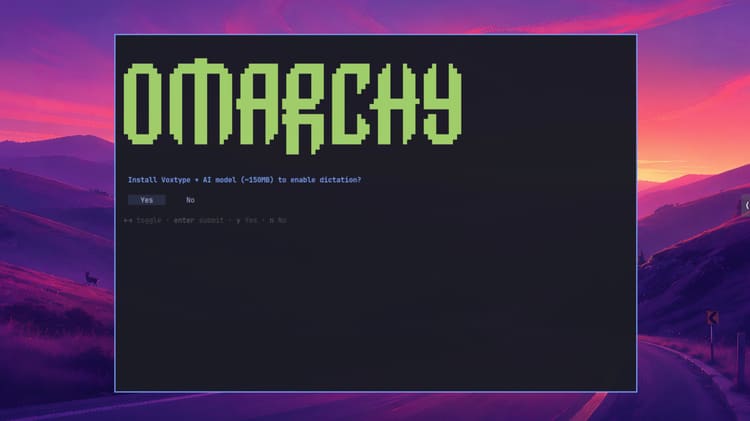
The screenshot captures Omarchy’s approach. The terminal dominates and exposes the package or update process, while important next steps appear as normal graphical notifications. Omarchy does not hide its Linux foundation, but it also does not require users to discover every feature in documentation or through an unknown command.
Office: LibreOffice is available, and Windows can run in a VM for special cases. This matters less to me today. Anyone who relies on complex Excel models, Office macros, or perfect PowerPoint compatibility should not assume the problem is solved.
Many tasks once tied to local applications now run in a browser or are handled by AI agents. My local software requirements have become small enough that a switch would no longer fail because of twenty indispensable Mac applications.
Quattro makes the desktop changeable
Quattro’s main technical rebuild is Quickshell. Its bar consists of plugins that can be moved, disabled, or replaced. Custom versions live in user configuration and survive Omarchy updates. Community plugins are available for users who do not want to build their own.
Here the agent concept is more interesting than a chatbot pasted onto the desktop. Omarchy includes a skill description that teaches supported coding agents about the system’s structure, configuration, and commands. An agent can design a panel, adjust Hyprland, or investigate a crash.
Quattro can monitor process crashes through systemd-coredump. A notification can send the crash and a diagnostic skill to the selected agent, which helps analyze it and prepare a bug report. The feature can be disabled, and AI is not required for normal use.
DHH says the roughly three-month Quattro development produced more than 1,000 pull requests, with agents significantly accelerating the work. This is the developer’s statement, not an independent quality metric. Pull-request counts do not prove stability, but they show how consistently the project embraces this workflow.
Rolling release with a safety net
The Arch base remains rolling release. Omarchy reduces risk with a controlled update path. New installations use the Stable channel and an Arch mirror roughly one month behind the newest packages. Security fixes and deliberately accelerated updates may differ. Experienced users can choose RC, Edge, or Dev.
An automatic system snapshot is created before an Omarchy update. If an update breaks the system, an earlier state can be selected in the bootloader and restored. The snapshot resets the root filesystem, not personal files under /home, so it is not a backup.
Installation uses full-disk LUKS encryption by default. The firewall blocks incoming connections except the LocalSend port, and SSH is enabled only when needed. These are sensible defaults.
They do not make Omarchy automatically secure. Community plugins run arbitrary unsandboxed code inside the long-running shell process. AUR packages are not automatically reviewed by Arch, and an AI agent with extensive shell access can change a great deal. Anyone moving to Linux for control should not immediately hand that control to unreviewed plugins and agents.
Fast installation is not long-term maintenance
In the presentation, DHH installs Omarchy on fast modern hardware in about a minute and compares this with much longer setup times for new Macs and Windows PCs. It is an impressive demo, not a neutral benchmark. Hardware, update state, network, and setup scope differ.

The installer already carries Omarchy’s visual identity, with its typography, colors, and a first Super + K hint. The screenshot does not prove an installation time, but it shows that onboarding starts before the first desktop appears.
The more useful claim is that Omarchy treats fast, reproducible installation as a feature. DHH’s preferred environment is already encoded in the image and installation paths instead of requiring a long list of downloads.
Neither a launch video nor an interview proves that it remains frictionless after six months. With a young rolling-release project, I would test stability, updates, suspend, docking, and recovery before replacing my Mac.
Which other distributions suit a work computer?
For colleagues coming from Windows or macOS, I would ask how much change and maintenance they accept rather than beginning with compiler flags.
Linux Mint: the sensible, familiar entry point
Linux Mint with Cinnamon is an unexciting recommendation in the best sense. Its menu, taskbar, window management, and settings feel obvious to many Windows users. Ubuntu LTS provides a large software selection and long support.
Mint is not for receiving every new kernel immediately or exploring a radical interface. It is for people who want to open a browser after installation and stop thinking about the operating system.
Zorin OS: minimal retraining
Zorin OS is based on Ubuntu and explicitly targets people replacing Windows or macOS. Zorin Appearance can imitate familiar layouts, while a graphical store, Zorin Connect for Android, and a live USB reduce barriers.

The screenshot makes the approach clear. Apps are organized by category in a conventional Start menu, and frequently used programs can appear as desktop shortcuts. Brave and LibreOffice Calc are visible immediately. The idea is not new, but it reduces retraining for Windows users.
The system deliberately includes many essential applications, although the exact selection depends on version, edition, and installation. Users who want a browser and office suite immediately save setup time. Anyone defining lean as nearly empty will first remove applications, while those who mean organized and ready to use may be in exactly the right place.
elementary OS: design as part of the product
elementary OS also belongs to the Ubuntu family, but Pantheon makes it more than an Ubuntu theme. The project maintains a consistent design, curated AppCenter, and selected base installation. Its promise of apps you need and nothing unnecessary directly addresses my macOS criticism.
The tradeoff is less freedom inside the intended interface. KDE Plasma better suits anyone who wants to rebuild every panel and window rule. elementary OS suits users seeking a calm, coherent system.
Fedora Workstation or Fedora KDE: modern without Arch assembly
Fedora is a strong choice for current hardware and modern Linux technology without building from a minimal Arch base. Workstation uses GNOME, while Fedora KDE offers a more conventional, customizable interface.
Its shorter lifecycle requires regular version upgrades. That is manageable but differs from several years of Ubuntu LTS.
CachyOS: performance with an easier entry
CachyOS builds on Arch with graphical installers, many desktops, its own repositories, CPU-optimized builds, and custom kernels. It compiles packages for newer x86-64 instruction sets and offers different schedulers. Current hardware, gaming, KDE, Hyprland, and rolling releases are much easier to approach than with a manual Arch installation.

The shown desktop does not reinvent interaction. Its Start menu, taskbar, and application categories deliberately resemble the classic Windows model. That familiarity is an advantage for many newcomers. CachyOS is not limited to this look, because the selected desktop environment and configuration determine the result.
Performance claims are not universal benchmarks. An optimization may be measurable, barely noticeable, or irrelevant to battery life depending on CPU and workload. Rolling release still means frequent updates and a need to understand snapshots, package downgrades, and rescue environments.
Lean does not automatically mean fast
A minimal installation has advantages. Fewer packages mean less attack surface, fewer possible background services, and fewer decisions made by others. Unneeded packages, services, and autostarts can be removed or disabled, while tools such as systemctl, ps, and top reveal what is running.
Three things should remain separate:
- Installed applications: They use storage but do not necessarily run.
- Background processes: Many sleep with almost no CPU usage and provide useful functions.
- Actual performance: It depends on CPU, RAM, storage, drivers, kernel, desktop, browser, and workload.
A KDE or GNOME system with a browser, Teams, Slack, Docker, development tools, and cloud synchronization can soon have as many processes as any modern operating system. Linux provides more ability to understand and change them, but does not repeal physics.

The real price of freedom is hardware
Apple controls the Mac’s processor, graphics, Neural Engine, firmware, operating system, and many applications. This limits me but enables integration that general-purpose Linux on arbitrary hardware struggles to match. Battery life, standby, camera, microphones, speakers, HDR, fingerprint reader, and external displays matter on a computer used every day.
Linux can run exceptionally well on a standard x86 PC. Support depends not only on the processor but on Wi-Fi, Bluetooth, webcam, fingerprint reader, audio, dock, GPU, and power states. A current kernel may help new hardware, while proprietary components may lack drivers or functions.
I would therefore not buy a work laptop based only on CPU benchmarks and hope Linux works. Hardware with official Linux support or preinstallation is safer. Other devices should be researched by exact model and device ID and tested from a live USB for wireless, camera, audio, suspend, wake, brightness, monitors, and dock.
The barrier is even clearer for my Omarchy idea. Omarchy supports Intel Macs but not Macs with Apple’s M-series directly. My newly purchased MacBook Air M5 with 32 GB of RAM is not a test candidate. With current prices for large memory configurations, I will certainly not buy a second notebook immediately. Because Omarchy does not support Apple Silicon, switching is not an option for me right now.
Linux on Apple Silicon is impressive, but not macOS
Fedora Asahi Remix has become a serious Linux system for M1 and M2 Macs, with accelerated graphics, KDE or GNOME, and support for many device functions. The Asahi Linux work is technically impressive.
It also reveals the limit. Apple’s hardware blocks must be reverse-engineered without complete public documentation. The M2 support matrix lists the Neural Engine only as experimental work outside the main kernel. Touch ID remains unavailable, while Thunderbolt and DisplayPort Alt Mode vary by generation. Newer generations from M3 onward have their own matrices.
Users who depend on the Apple Neural Engine for local AI cannot simply install another distribution and retain the same integration. Metal, media accelerators, iPhone integration, and some commercial software also remain macOS advantages.
The fair conclusion is not that Linux is bad on a Mac, but that a Mac was built for macOS. A primary Linux work computer should use hardware whose manufacturer and components explicitly support it.
Software can also stop the switch
Linux is often straightforward for browsers, Visual Studio Code, developer tools, Docker, password managers, chat, and web apps. Adobe Creative Cloud, full Microsoft Office with macros, some VPN and security clients, proprietary media tools, and mandatory corporate agents remain harder.
Wine, virtual machines, and web versions can bridge gaps but are not universal replacements. Every indispensable application needs an honest check: is it native, or does the web version lose features, offline use, or integration?
Corporate IT also decides. VPN, EDR, and device management must support Linux and be approved. Otherwise a technically functioning computer may still violate policy. LibreOffice opens many Office documents but cannot guarantee complex layouts or complete macro compatibility.
The physical workplace matters too. Docks, monitors, camera, microphone, and headset must work reliably. I would always keep a way back for the first test. Dual boot, a second SSD, or a separate device reduces risk and prevents curiosity from becoming downtime.
My practical recommendation
First-time desktop Linux users should not start with the theoretically fastest distribution. Check hardware and indispensable applications first, then try two or three interfaces from a live system.
Linux Mint, Zorin OS, or elementary OS are calm entry points. Fedora GNOME or KDE suits users who value current technology over long LTS periods. CachyOS is interesting for modern hardware, gaming, and people prepared to maintain rolling release. Omarchy suits anyone wanting to try a keyboard-centered work model rather than reproduce Windows or macOS.
I am not leaving the Mac immediately. If a suitable test device appears later, I would recreate my real routine on Omarchy: browser, Codex and other agents, terminal, 1Password, Zed, screenshots, transcription, calls, dock, and external displays. Only several weeks without instinctively returning to the Mac would turn fascination into a credible reason to switch.
One week of real work says more than a hundred “best Linux distribution” lists. A beautiful demo becomes a work computer only when suspend, file exchange, passwords, corporate access, and all the small habits work.
Scope and limitations
This is not a benchmark study or my own long-term test. The Omarchy assessment is based on DHH’s Quattro presentation, his NetworkChuck interview, and official documentation, checked on August 26, 2026. Development time, pull-request counts, and installation time are developer claims that I did not measure. Versions, hardware support, and requirements can change quickly in a young rolling-release project.
The two macOS screenshots show my computer at one moment. The 834 processes are not a universal comparison or proof that macOS is slow. They prompted a different question: how much control do I want over my work computer, and which compromises am I willing to accept?
Conclusion
Linux is not automatically faster, leaner, or simpler than macOS. Omarchy is not an empty system without opinions. It is full of DHH’s decisions, which is precisely why it is more interesting than another attractive Arch configuration. Those choices form a recognizable work model and can still be removed, overridden, or extended.
This would have appealed to me less a few years ago, when more workflows depended on classic desktop software and the Apple ecosystem. Today I mostly need a browser, AI agents, a terminal, and a few specialist tools. Omarchy is built around the same priorities, so Linux feels not only technically interesting but potentially better suited to my real work.
The objections remain strong. My new MacBook Air M5 with 32 GB of RAM is unsupported by Omarchy. Apple Silicon offers efficiency, battery life, and deep integration. Linux would lose normal Neural Engine access, Touch ID, and parts of the ecosystem. Buying extra hardware merely for a trial makes no sense at current RAM prices.
A switch is therefore not an option right now. But the seed has been planted. If Apple keeps moving in a direction that no longer works for me, and closed integration no longer offers enough benefit, the “open” system might one day become not merely something new, but something better.
Until next time,
Joe
FAQ
What is Omarchy Quattro?
Can I install Omarchy on an Apple Silicon Mac?
Do I have to use AI agents in Omarchy?
Which Linux distribution is best for beginners?
Do I constantly need the terminal on Linux?
Is Arch Linux faster than Debian or Fedora?
Can Linux use the Apple Neural Engine?
How do I test whether my laptop is suitable for Linux?
Sources
- DHH: Full Omarchy Quattro version 4 presentation
- NetworkChuck: DHH interview about Omarchy, Linux, and AI agents
- Omarchy documentation: Update channels, package mirror, and rollback
- Omarchy documentation: Encryption, firewall, and security model
- Microsoft: Windows Vista consumer launch on January 30, 2007
- Arch Linux: Principles, Pacman, and rolling release
- Zorin OS: Interface, Ubuntu base, and live test
- CachyOS: Package, kernel, and CPU optimizations
- Asahi Linux: Fedora Asahi Remix and supported device functions
- Asahi Linux: Feature support for M2 systems