Sophos vs Palo Alto 2026: Which Firewall Fits?
Network Sophos SecurityTable of Contents
When someone searches for Sophos vs Palo Alto, the real question is rarely which appliance has the prettier feature list. It is actually about an operating model. Do I want a firewall that a small or mid-sized team can understand quickly and fit into an existing Sophos Central world? Or do I want a security platform that combines App-ID, User-ID, Panorama, Strata Cloud Manager, Prisma Access, logging, and automation as an enterprise toolbox?
With Sophos Firewall vs Palo Alto, you are not comparing two identical products with different logos. You are comparing two schools of thought. Sophos feels more like an integrated security tool for admins who want to get as much done as possible from one platform. Palo Alto feels more like a precise enterprise instrument: powerful, expensive, methodical, sometimes heavy, but extremely resilient in the right hands.
My starting point here is not neutral in the sense of being emotionless. I like working with Sophos Firewalls because many things are logically arranged in daily operations and because Sophos often removes a lot of friction in classic mid-market networks. At the same time, I can feel my patience with Sophos getting thinner. The firewall has good foundations, but important admin topics take too long. When analysis, diffing, and now even configuration changes move into an external browser tool like Config Studio, that is practical, but it is also a warning sign. Those workflows belong in Sophos Central or directly in the firewall UI. Together with the current Sophos Firewall bugs in v21.5 through v22, I am more skeptical right now than I expected to be two years ago.
With Palo Alto, I see things differently. I see less of the “friendly firewall” and more of a system that enforces clear processes: candidate config, commit, zones, NAT flow, security profiles, Panorama policy hierarchy, log architecture. That can be annoying. But in larger environments, exactly that strictness is often an advantage.
What matters is how safely and confidently your team can operate the chosen platform in everyday work.
The Short Answer: It Is About Maturity
When a company buys Palo Alto, it is not just buying a firewall. It is buying the ability to control network access very granularly by application, user, device, threat profile, and central policy. That is worth it if a team really uses that depth. For regulated environments, large rule sets, SASE strategy, Prisma Access, long log retention, API automation, and clear change governance, Palo Alto is usually the stronger choice.
Sophos plays a different game. Its value is more about getting productive quickly, less console stress in the mid-market, easier-to-understand rules, useful integrated functions, strong Central integration, and often a much more pleasant price-performance ratio. Sophos is not the “small” solution, but it is more strongly optimized so a smaller team can operate it without building its own Palo Alto specialization.
My tendency for 2026: anyone looking for a paloalto alternative in the mid-market should seriously test Sophos. Anyone looking for a long-term enterprise security platform with mature automation, a ZTNA/SASE path, and deep app control will much more often end up with Palo Alto.
This is not a romantic vendor question. It is more a maturity question: how much security engineering can and does your team really want to operate?
What I Look At In This Comparison
With Palo Alto, a classic price and feature matrix is not enough. The decisive point is not only performance or price, but whether the platform is operated with discipline. A poorly maintained Palo Alto environment quickly becomes expensive and complicated. A well-maintained Palo Alto environment, on the other hand, can scale very cleanly for years.
That is why I pay special attention to these points:
- Policy model: Is the environment really using App-ID, User-ID, and Security Profiles, or only ports?
- Change workflow: Does candidate config plus commit help, or does it slow the team down?
- Remote access: Is classic VPN enough, or are GlobalProtect and Prisma Access strategically relevant?
- Logging: Is there Panorama, Log Collector, or Strata Logging Service, or only local logs?
- Automation: Are APIs, Terraform, Ansible, and dynamic objects being used?
- Operating costs: Are subscriptions, logging, management, and support fully calculated?
- Team know-how: Is there someone who really understands PAN-OS?
With Sophos, I look at different things: how far can you get with Central, how quickly are changes understandable, how much does the platform save in daily operations, and where does it become painful because of missing depth, a slow UI, or external helper tools?
Quick Comparison
| Area | Sophos Firewall | Palo Alto Networks NGFW | My Take |
|---|---|---|---|
| Security architecture | Xstream, FastPath, Secure-by-Design hardening in SFOS v22 | App-ID, User-ID, Content-ID, single-pass architecture | Palo Alto is deeper in app and content control; Sophos has visibly caught up on platform hardening with v22. |
| Rules and NAT | approachable, readable, NAT separate, but weak for bulk workflows | very methodical, zone model, NAT and security separated, strong policy depth | Sophos is faster to understand, Palo Alto scales more cleanly in complex rulebases. |
| VPN / ZTNA | Sophos Connect, SSL VPN, IPsec, Sophos ZTNA through Central | GlobalProtect, HIP, Prisma Access, ZTNA Connector | Palo Alto is more complete for remote access and enterprise ZTNA, while Sophos stays simpler for classic setups. |
| SD-WAN | solid for mid-market, SD-RED strong for simple branches | NGFW SD-WAN, Prisma SD-WAN, better enterprise story | Sophos is often enough; Palo Alto feels more mature in large WAN designs. |
| Web / IPS / TLS | good Web Protection, DPI, TLS 1.3, Xstream offload on hardware | Advanced URL Filtering, Advanced Threat Prevention, WildFire, very deep policies | Sophos is pragmatic, Palo Alto is stronger in high-end web security. |
| WAF | integrated Web Server Protection with clear limits | no classic on-box WAF on NGFW, more Prisma/WAAS or dedicated WAF | Sophos wins for simple publishing; real AppSec belongs on dedicated WAFs. |
| Email security | firewall module exists, but is strategically outdated | not a core firewall function, separate email security products | Sophos has more on the box, but innovation has long moved to Central or specialized solutions. |
| Central management | Sophos Central is simple, but firewall config management remains limited | Panorama and Strata Cloud Manager are more powerful, but more complex and expensive | Sophos wins on simplicity, Palo Alto on professional scaling. |
| Logging / reporting | usable locally, Central Reporting is cloud-only, Advanced costs extra | local reports, Panorama, Log Collectors, Strata Logging Service | Sophos is faster to use, Palo Alto is better for large retention and SOC models. |
| API / automation | XML/API workflows, SDK, Config Studio as helper path | PAN-OS API, Terraform, Ansible, Panorama workflows | Palo Alto clearly wins for Infrastructure as Code. |
| Cost | often heavily discounted, good price-performance ratio, but the promo culture sometimes feels cheap | premium price, many subscriptions, strong platform | Sophos is more realistic for many budgets; Palo Alto has to really deliver its added value. |
| Roadmap | strong hardening, but slow admin ergonomics | high platform momentum across Strata, Prisma, and PAN-OS | Palo Alto feels strategically faster; Sophos needs to catch up in the core product. |
Security architecture and firewall rules
Security Architecture: Xstream Versus App-ID
In the security architecture, the difference between the two vendors is very clear.
Palo Alto has built its identity strongly around App-ID, User-ID, and Content-ID. The firewall is not supposed to see only ports and IPs, but applications, users, functions, risks, and content. That is more than marketing. In practice, App-ID in particular is a strong argument because policies do not simply have to allow “tcp/443 to the Internet”; they can control specific applications and sometimes application functions. Together with User-ID and device context, that creates a very granular policy approach.
Sophos approaches the topic differently. The Xstream architecture combines a DPI engine with FastPath offloading. On XGS hardware, the Xstream Flow Processor can accelerate certain flows after they have been initially evaluated. With SFOS v22, Sophos also did a lot under the hood: hardened Linux kernel 6.6+, stronger process isolation, containerization of services such as IPS, Remote Integrity Monitoring through an integrated XDR Linux sensor, Health Check, and self-healing approaches for HA.
That matters because Sophos is not only trying to deliver “more features”; it is trying to make the firewall itself harder to attack. Especially after the last few years, in which edge devices in general became a preferred target for attackers, that is not a nice detail. It is a real architecture point.
Still: in my view, Palo Alto remains ahead for deep app and content control. Sophos has an interesting counterargument with Synchronized App Control when Sophos Endpoint is in use. Then the firewall knows more accurately through Security Heartbeat which process on the client is generating traffic. That can be very useful in real environments. Without Sophos Endpoint, however, that advantage disappears, and Palo Alto with App-ID is usually more precise and consistent.
My take: Sophos made a very good step with SFOS v22 around Secure by Design and platform hardening. But Palo Alto is still the stronger choice when the firewall is meant to be a highly granular Layer 7 enforcement system in the enterprise.
Security Advisories and Patch Discipline
Firewalls sit at the edge of the network. That makes them valuable for defenders and attractive for attackers. That is why, for buying decisions, I now pay more attention to security advisories and patch processes than I used to.
For Palo Alto, CVE-2024-3400 was a massive break. The vulnerability affected GlobalProtect in certain PAN-OS configurations, had CVSS 10.0, and according to Palo Alto was discovered in production. CISA actively warned at the time about exploitation in the wild. Later, management interface issues followed, such as CVE-2024-0012, CVE-2024-9474, CVE-2025-0108, and CVE-2025-0111, where Palo Alto itself documented exploit attempts or attack status. The important caveat here: many of these risks strongly depend on whether management interfaces are reachable incorrectly or too broadly. But exactly that happens in real networks more often than architecture diagrams would suggest.
Sophos has also had critical firewall CVEs, including the December 2024 advisory for CVE-2024-12727, CVE-2024-12728, and CVE-2024-12729. Sophos writes in the advisory that hotfixes were provided for affected versions and that automatic hotfix installation is enabled by default. Sophos also states there that no exploitation had been observed at that time. Historically, however, Sophos has also had actively exploited vulnerabilities that should not be forgotten.
The operational difference lies in the patch model. Sophos’ automatic hotfixes without the classic firmware upgrade pain are a major advantage in an emergency. Palo Alto works more classically with hotfix versions, maintenance windows, reboots, and HA failover. That is not automatically worse, but it requires more disciplined operating processes.
My take: Palo Alto has experienced hard, publicly visible edge incidents in recent years. Sophos has also had critical vulnerabilities, but scores points with hotfixing and transparency around Secure by Design. In both cases the rule is: no WAN management, MFA everywhere, strongly restrict admin access, subscribe to advisories, and do not postpone upgrades for months.
Firewall Rules and NAT
In daily operations, a lot is decided by rules and NAT. Here, Sophos is nicer to read, but Palo Alto models things more cleanly.
Sophos rules are intuitive for many admins: source, destination, service, zone, user, web policy, IPS, application control, logging. Since SFOS v18, NAT has been cleanly separated from the firewall rule set. For typical DNAT, SNAT, and hairpin scenarios, that is easy to follow. When I search for a server publishing rule, I usually find what I need faster in Sophos.
Palo Alto is conceptually more demanding. Security policies and NAT policies are strictly separated. NAT logic with pre-NAT and post-NAT perspectives feels unfamiliar to many admins at first. Then there are the zone model, App-ID, services, URL categories, security profiles, decryption policies, pre- and post-rules in Panorama, template stacks, and device groups. That is more mental effort, but also more structure in large environments.
Palo Alto forces you more strongly to design cleanly. Sophos allows faster work, but exactly that directness sometimes becomes a weakness in large rule sets. Bulk changes, NAT cloning, shadow rules, object usage, and change diffs should be much better directly in the firewall or Sophos Central in 2026. The fact that people now increasingly look to Config Studio for this is not a sign of product maturity to me, but a symptom.
My recommendation: if you have a few hundred rules and a small team, Sophos is probably more productive. If you need many teams, multiple sites, governance, and policy inheritance, Palo Alto with Panorama or Strata Cloud Manager is more professional in the long run.
Connectivity and site networking
VPN, ZTNA, and Remote Access
Remote access is especially interesting in this comparison because the two vendors come from different directions.
Palo Alto has a very mature remote-access platform with GlobalProtect. Always-On, Pre-Logon, HIP checks, device posture, User-ID integration, and the bridge to Prisma Access are strong arguments. Anyone who wants to build enterprise remote access will find a very complete model with Palo Alto. The price for that is complexity and licensing. GlobalProtect is not simply “VPN included and done” if you seriously want to use the advanced features.
Sophos offers classic remote access with Sophos Connect over IPsec and SSL VPN. For many environments, that is completely enough. With SFOS v22 MR1, SSL VPN support for Sophos Connect 2.0 on macOS arrived, while legacy Remote Access IPsec was removed. From a security perspective that is right, but operationally it is a clear migration point. Anyone running old Sophos setups needs to check this carefully before simply updating.
For ZTNA, Palo Alto looks stronger when it comes to enterprise architectures. Prisma Access, ZTNA Connector, and the combination of User-ID, App-ID, and Device-ID are strategically very rounded. Sophos ZTNA is simpler and fits well into Sophos Central, but it feels less deep and less complete. For many mid-market cases, Sophos ZTNA is still attractive because you do not have to start a large SASE project immediately.
My conclusion on remote access: Sophos is simpler and often faster to get productive for classic admin teams. Palo Alto is stronger when remote access, ZTNA, device posture, and SASE are part of a long-term zero-trust architecture.
SD-WAN
With SD-WAN, the question is: do I need “good enough”, or do I need a WAN design as a strategic platform?
Sophos can do the typical things: SD-WAN routes, gateway monitoring, performance-based selection, VPN orchestration through Central, SD-RED for very simple branch connectivity, and central visibility into connections. SD-RED in particular is a real practical argument. For small branches, retail, simple branch offices, or technical sites, it is very pleasant when someone on site basically only has to plug in a device.
Palo Alto is stronger when the WAN becomes larger and more demanding. SD-WAN for NGFW, Prisma SD-WAN, Prisma Access as backbone, app-based steering, central policy, QoE, and large-scale branch models feel more mature in an enterprise context. But it is also more expensive and less low-threshold.
I would not describe Sophos as weak. Many companies do not need a highly complex SD-WAN. If the goal is to run two Internet lines, a few VPNs, SaaS priorities, and branch failover cleanly, Sophos is often enough. But if you are modeling 80 sites, multiple regions, cloud hubs, Prisma Access, and differentiated application paths, I would clearly prefer Palo Alto.
Protective services and inspection
Web Protection
Sophos Web Protection is easy to understand in daily operations. You can click through categories, exceptions, HTTPS decryption, user context, and protection profiles fairly quickly without first designing a separate policy framework. That fits teams that want to run web security cleanly without turning every policy into a small research project.
Palo Alto goes deeper. Advanced URL Filtering uses inline and cloud-based detection, and Palo Alto combines web control closely with App-ID, User-ID, DNS Security, Advanced Threat Prevention, and WildFire. That is especially strong for phishing, fast-changing domains, unknown URLs, and finer controls. But a lot depends on subscriptions and clean design.
The important point is this: Web Protection without TLS inspection is becoming less meaningful. Both vendors can inspect TLS 1.3. Both need exceptions. Both have to deal with QUIC, HTTP/3, SaaS edge cases, banking, health portals, certificate pinning, and privacy requirements. I would never decide this from a datasheet. I would run a pilot with real clients, real browsers, and real business applications.
My take: Sophos is better for simple, manageable web policies. Palo Alto is stronger when web security is a high-end discipline with app context, inline ML, DNS Security, and SOC integration.
IPS and TLS Inspection
With IPS and TLS inspection, you have to be very careful with vendor numbers. Datasheets rarely show your reality. The decisive factor is not maximum firewall throughput, but the real mix of TLS decryption, IPS, URL filtering, app control, logging, packet sizes, concurrent sessions, SaaS, updates, and video traffic.
Palo Alto is architecturally very strong here. Single-pass, App-ID, security profiles, Advanced Threat Prevention, WildFire, Advanced URL Filtering, and the clear separation between App-ID throughput and threat prevention throughput make sizing more transparent. If I had to design an environment with high decryption load and a strong security profile, I would have more confidence in Palo Alto, assuming budget and know-how are available.
Sophos XGS can also perform very well in many real mid-market scenarios. The Xstream Flow Processor helps on hardware appliances, and the DPI engine is no longer an old multi-pass UTM stack. But there is an important point here that is often overlooked: more and more firewalls run virtually, in Azure, AWS, or as software appliances. There is no physical Xstream Flow Processor there. Sophos does say that the architecture does not depend on custom ASICs and also runs on general-purpose CPUs. Still, the concrete hardware offload advantage of XGS appliances disappears in virtual environments.
That is why I do not think Sophos can rely too heavily on a hardware NPU narrative in the long run. Cloud and virtual deployments are becoming more important, and there CPU sizing, architecture, parallelization, logging, and good policy designs matter at least as much.
For price-performance, however, Sophos often looks better. Especially when a customer does not need the absolute high end, Sophos often gives you a lot of firewall for the money. Palo Alto is more expensive, but in demanding scenarios the higher price can be technically justified. You just have to really need it.
WAF
Sophos has integrated Web Server Protection on the firewall. That is practical for many classic publishing scenarios: reverse proxy, WAF rules, templates, protection profiles, authentication, SNI, and simple web server publishing. For small and mid-sized environments, it can simplify operations significantly.
But you have to stay honest: the Sophos WAF is not a modern enterprise WAF. The documentation lists clear limits, including IPv4 focus, a maximum of 60 WAF rules, no WebDAV, and no support for Exchange versions newer than 2013. For Nextcloud, complex APIs, bot management, modern WAAP use cases, or highly critical web platforms, I would not use an on-box firewall WAF as the main protection.
Palo Alto does not have a comparable on-box WAF on the classic NGFW. In the broader Palo Alto portfolio, there are app and cloud security functions, Prisma Cloud WAAS/WAAP approaches, and other building blocks. But that is not the same as “quickly build a WAF rule on the firewall”.
My recommendation: Sophos wins if you want to publish simple web servers pragmatically. For serious AppSec, Cloudflare, F5, Imperva, Akamai, Prisma Cloud WAAS, or a dedicated WAF/WAAP solution belong in the discussion. A firewall WAF is convenience, not automatically an AppSec strategy.
Email Security
For email security, I have to classify Sophos critically. Yes, Sophos Firewall has an email module. Yes, historically that was an important argument for many UTM customers. But it is not exactly a secret that this firewall function is more something that keeps running than something that has been strategically modernized for years.
In my view, the Sophos Firewall email solution is now outdated. It can still help in simple scenarios, but it is not the direction Sophos is really investing in. Sophos is more likely to move customers toward Sophos Central Email or Sophos Email Plus. That makes technical sense because modern email security today lives heavily in M365, API integration, BEC detection, post-delivery remediation, and cloud workflows. In terms of price, however, it is again significantly more expensive than “it was just included on the firewall”.
I have already written separately about Sophos Email Plus. For this comparison, the short version is enough: Sophos has more email functionality on the firewall than Palo Alto, but that should not be a main reason to buy Sophos today.
Palo Alto is more clearly separated here. The NGFW is not an email security appliance. Email security comes through separate products and integrations. From an enterprise perspective, that is cleaner, but from an SMB perspective it is also more expensive and less integrated.
My take: if you are seriously planning new email security today, I would not decide it on the firewall. Put M365 Defender, Proofpoint, Mimecast, Sophos Central Email, or another modern cloud solution into the evaluation. The firewall can help, but it should not be the heart of mail security.
Management and automation
Central Management
Sophos Central is one of the main reasons I generally like Sophos in daily operations. Seeing firewalls, backups, firmware, alerts, Central Reporting, SD-WAN status, group assignment, and the jump into firewall management is straightforward. For small teams, that is valuable.
But Sophos Central has had mostly the solid basic toolkit for firewalls for years, and that is often where it stops. Simple standards can be distributed, and individual objects too. But as soon as this is supposed to become real policy governance across multiple firewalls, with dependencies, exceptions, review, and traceable diffs, it becomes awkward. Group configurations help, but they are not a Panorama replacement. In practice, this often leads to more headaches than real relief in more complex multi-firewall setups.
Palo Alto has the more professional story with Panorama and now Strata Cloud Manager. Device groups, templates, template stacks, pre- and post-rules, central commits, policy inheritance, versioning, log integration, and larger rollout models are much more mature. Strata Cloud Manager also moves Palo Alto further toward cloud-based management and operations.
The downside: it is more complex and it costs money. Palo Alto is not the platform you just manage centrally a little bit on the side. You have to learn it and operate it cleanly. But if you do, you get a management model that Sophos currently does not reach for firewalls.
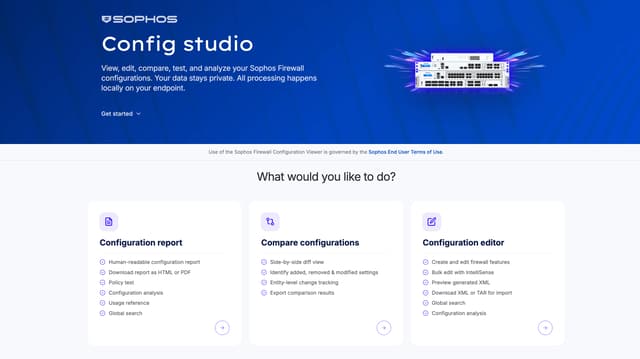
The most critical point for me remains Config Studio. The tool is useful, but it reinforces the question of why these functions do not live natively in Central or WebAdmin. Palo Alto has had exactly these change, template, and policy workflows in its management layer for years. Sophos is building a parallel browser tool around exported Entities.xml files. That is fine for audits, but it is not my ideal picture of modern firewall administration.
Logging and Reporting
Logging is one of those categories that is often presented incorrectly in sales conversations.
Sophos has usable on-box logging and reporting. For quick analysis, web reports, user evaluations, and typical daily questions, that is pleasant. But the appliance itself is not designed to carry months of forensics with large log volumes cleanly. For that, there is Sophos Central Firewall Reporting. The approach is good because it is simple and does not require your own log infrastructure. But it is cloud-only, licensed per firewall or per Central account, and costs extra. Older public Sophos information listed 119 USD per 100 GB per year as the entry point for CFR Advanced; current prices should always be checked through the partner. The fact is: “reporting is simply included” is only true up to a point.
With Xstream, there are limited Central Reporting functions and 30 days in certain bundles, but if you want one year of retention, need additional storage blocks, or want to analyze multiple firewalls over a longer period, it becomes a separate cost factor. Technically that is fine, but it belongs honestly in the TCO.
Palo Alto has local ACC, traffic, threat, URL, and system logs, as well as more than 40 predefined reports plus custom reports. For serious retention, correlation, and central analysis, however, you end up with Panorama Log Collectors or Strata Logging Service. That is powerful, scales better, and fits large SOC models. But here too: it costs money and has to be planned cleanly.
My take: Sophos is faster to use in small and mid-sized daily operations. Palo Alto has the better architecture for large logging and retention requirements, but you pay for it. Anyone who buys Palo Alto without a log strategy is buying only half the platform.
API and Automation
This is where the gap is clearest.
Palo Alto is much stronger for automation. PAN-OS has APIs, and there are Terraform providers, Ansible collections, SDKs, dynamic address groups, Panorama workflows, and an ecosystem that NetOps and SecOps teams have used for years. Anyone who wants to integrate firewall configuration into CI/CD, GitOps, or Infrastructure as Code will find much more substance with Palo Alto.
Sophos has APIs, but firewall automation feels older and less elegant by comparison. The XML-heavy world works, but in 2026 it no longer feels modern. The fact that Config Studio can generate API or curl output is useful, but it is also a hint that the actual API and change workflow is not where it should be.
Sophos itself says that the new v22 architecture lays the foundation for future full RESTful APIs. That is exciting, but today it is not a finished advantage. A roadmap is not a replacement for current operational capability.
My recommendation: if your team takes automation seriously, Palo Alto clearly wins. Sophos can be automated, but today I would not describe it as an IaC-first firewall platform.
Operations and costs
Performance
Performance is a dangerous comparison field because almost every vendor shows numbers that are only roughly related to the real environment. What matters is not which vendor lists the highest best-case throughput in the datasheet. What matters is what happens with your policies, your traffic, your TLS ratio, your logs, and your sessions.
Palo Alto is very strong in high performance classes. The platform is designed for consistent security inspection, App-ID, Threat Prevention, and central models. Especially when decryption and IPS really matter, I would take Palo Alto very seriously in large environments. But you have to size it appropriately and not believe that the smallest PA box with all security subscriptions suddenly protects a datacenter.
Sophos has a good price-performance ratio. In many mid-market setups, you get a lot of throughput, many functions, and often much better commercial terms with Sophos. Especially through Sophos’ discount and bundle strategy, that can be economically attractive. But you have to distinguish cleanly: XGS hardware with Flow Processor is not the same as a virtual Sophos Firewall in Azure or AWS. There, CPU, cloud NIC, instance type, architecture, and sizing matter. Hardware offload is not an argument there.
I would run a real pilot with both vendors. Not just a speed test. Turn on TLS inspection, IPS, web policies, logging, large downloads, Teams, SaaS, updates, VPN, HA failover, and a few broken applications that only appear with real users. Then you quickly see whether the datasheet helped or was just pretty.
HA and Stability
Both vendors can do HA. Both can do active/passive. Both can do active/active in certain scenarios. And with both, I would use active/active only very deliberately.
Palo Alto HA is well understood in the enterprise. Active/passive is the standard path, active/active more of a special case. The documentation is clear about what is synchronized and what is not. For large environments, that is an advantage because there are many established designs, runbooks, and partner experiences.
Sophos HA is easier to set up and stable in many setups, but I have become more careful with upgrades. The Sophos documentation lists clear limits: no session failover for VPN traffic, proxy traffic, UDP, ICMP, multicast, and broadcast. Active/active does not load-balance everything, and exactly those details matter in operations. SFOS v22 added self-healing HA features, which is a good step. At the same time, there were enough bugs in the v21.5 through v22 phase that I would no longer update production clusters without a clean test plan.
My approach would be the same with both vendors: reproduce HA in the lab, check upgrade paths, test failover, observe VPNs, compare logs, and have clear rollback plans. Palo Alto gives me more calm in large designs. Sophos is simpler, but right now I would look more closely at every major release.
Licensing and Cost
On cost, Sophos is usually easier to sell and Palo Alto is easier to justify when the requirements are high enough.
Sophos has a comparatively simple model with Standard Protection, Xstream Protection, and add-ons. It is not perfect, but it is usually easier to understand than Palo Alto. At the same time, Sophos sometimes behaves in the channel like a discounter where every product has some promotion. 99 percent hardware promos, bundle discounts, special campaigns, trade-ins, migration offers - it does not always feel serious, even if the product is serious. For customers that is financially pleasant, but it makes list prices almost meaningless.
Palo Alto is premium. Threat Prevention, Advanced Threat Prevention, Advanced URL Filtering, Advanced DNS Security, Advanced WildFire, GlobalProtect, SD-WAN, Strata Logging Service, Panorama, or Strata Cloud Manager - depending on what you really need, quite a lot adds up. In return, you get a strong platform. But the TCO has to be calculated cleanly. A Palo Alto box without the right security subscriptions and without a logging strategy is usually not the product that was sold in the sales deck.
My take: Sophos is economically more attractive for many customers and often completely sufficient. Palo Alto is worth it when the technical depth is really needed. If a customer is only looking for “a good firewall”, Palo Alto is often too expensive. If a customer is looking for a strategic enterprise security platform, Sophos is often too thin.
Support
Support is hard to evaluate fairly because experiences depend heavily on the specific case, partner, country, support level, and escalation path.
I do not want to judge Palo Alto support too harshly because my direct experience with it is too far in the past. What I take from projects and conversations is this: Palo Alto TAC can go very deep, but there too, a lot depends on the case and the support level. With complex problems, you quickly end up in long analyses, logs, tech support files, and reproduction questions anyway.
With Sophos, support used to be partly really bad from my perspective. It has become much better in the meantime. Still, a lot depends on the individual support engineer. Some cases run well, others drag on. And when we have support cases at the company, they are often so complex that they take longer anyway. That is not necessarily only Sophos’ fault, but it is reality.
For me, therefore, it is not only vendor support that matters, but also the partner. A good Palo Alto partner can make the difference. A good Sophos partner too. Especially with firewalls, first-level sales are nice, but in an emergency you need someone who understands packet flow, logs, policy, NAT, VPN, and vendor-specific behavior.
Platform, partners and roadmap
MSP and Partner Fit
This is partly a sales topic, but not only. Internal IT teams can also benefit when a vendor maps tenants, groups, templates, standardization, and repeatable rollouts well.
Sophos is strong here in the classic MSP and mid-market model. Sophos Central Partner, Flex billing, tenant management, simple product bundles, and the ability to see firewalls, endpoint, email, ZTNA, and other products in one platform are attractive in daily operations. For IT service providers with many small and mid-sized customers, that is a real advantage.
Palo Alto is also strong in the partner and MSSP environment, but more in the upper segment. The platform requires more know-how, more tooling, and usually larger projects. Strata Cloud Manager and Prisma models move more toward cloud operations and multi-tenant, but the entry barrier remains higher.
For internal IT, this means: if you support many sites or companies with a small team, Sophos feels manageable faster. If you have a large security team with clear roles, SOC, change advisory, automation, and partner support, Palo Alto fits better.
Usability In Daily Operations
Sophos is often friendlier in daily operations. The GUI is easier to understand, many workflows are visually clear, and as an admin you find out faster what is happening. That is exactly why I generally like working with Sophos.
But this friendliness has limits. With larger configurations, the UI feels sluggish. Some lists are not flexible enough. Bulk changes are not where they should be. Central firewall group configurations solve only part of the problem. And Config Studio makes many things visible, but it is not a replacement for a modern native change experience.
Palo Alto is harder at the start. The UI is denser, the commit model annoys many admins, and you have to know what you are doing. But as the environment grows, the product feels more controlled. Commit, candidate config, audit, Panorama, templates, and device groups are not always fast, but they are methodical. In large environments, that matters more than click comfort.
My personal impression: Sophos is the firewall I would rather give to a small admin team. Palo Alto is the platform I would rather give to a mature security engineering team.
Development Speed and Roadmap
This is where my conclusion for Sophos becomes more critical.
Sophos delivered important things with SFOS v22 and v22 MR1: Secure by Design, hardened kernel, Remote Integrity Monitoring, NDR extensions, Health Check, audit improvements, VPN fixes, and macOS Sophos Connect improvements. That is real. I do not want to talk it down.
But visible admin ergonomics are developing too slowly. Many things admins have wanted for years arrive late or end up in external tools. Config Studio V2 is the best example from my point of view. It is useful, but it feels like a side stage that should actually be part of the core product. When a tool outside Sophos Central and outside the firewall UI compares configurations, edits them, and exports them as XML or API/curl, I ask myself: why is that not directly part of the management workflow?
Palo Alto feels strategically faster. Strata Cloud Manager, Prisma Access, ZTNA Connector, PAN-OS 12.1 support cycle, Advanced Threat Prevention, Advanced URL Filtering, Logging Service, automation - there is a lot of movement. It also brings complexity and rebranding pain, no question. But it communicates more platform momentum.
My expectation of Sophos for 2026/2027 would be clear: fewer side tools, more native integration. A modern REST API, clean multi-firewall config workflows in Central, better bulk changes, a faster UI, and fewer regressions in major releases. If Sophos delivers that, my judgment can improve significantly. If not, Palo Alto will keep pulling away in the strategic comparison.
When I Would Choose Sophos
I would choose Sophos Firewall when:
- the company is small to mid-sized,
- Sophos Central or Sophos Endpoint is already set,
- the team does not want to build deep PAN-OS specialization,
- price-performance matters,
- simple branch connectivity or SD-RED is helpful,
- on-box WAF is enough for simple publishing,
- Web Protection and reporting should be usable quickly,
- operations have to be more pragmatic than the architecture slide.
In environments like these, Sophos can make a lot of sense. You get an easy-to-understand firewall, decent security functions, a strong Central ecosystem, and often a good commercial package. But you have to accept that API, central configuration control, and enterprise change workflows are not at Palo Alto level.
When I Would Choose Palo Alto
I would choose Palo Alto when:
- App-ID and very granular Layer 7 control are decisive,
- remote access and ZTNA are strategically important,
- Prisma Access or SASE is already on the roadmap,
- Panorama or Strata Cloud Manager can be operated professionally,
- long log retention and SOC integration matter,
- Infrastructure as Code is a real goal,
- many teams, regions, sites, or compliance requirements are involved,
- budget and know-how fit the platform.
In my view, Palo Alto is not simply “the better firewall”. It is the better platform for environments that can really use this depth. If you buy Palo Alto and then only build a handful of port rules, you probably paid too much.
Is Sophos A Real Palo Alto Alternative?
Yes, but not everywhere.
As a paloalto alternative in the mid-market, Sophos is absolutely legitimate. Many companies do not need a Panorama world, a Prisma project, a highly granular App-ID policy, or a complex log architecture. They need a firewall that runs reliably, is understandable, can do VPN, offers Web Protection, reports cleanly, and does not blow up the budget. For that, Sophos is often very strong.
As an alternative in enterprise hybrid mesh, SASE, cloud, SOC, and IaC environments, Sophos is more difficult. There, Palo Alto competes less with Sophos than with Fortinet, Check Point, Zscaler, Cloudflare, Netskope, and other platforms, depending on the architecture. Sophos can play there, but it rarely delivers the same depth.
So the right question is not “Sophos or Palo Alto, who wins?”. The right question is: what is the realistic operational maturity of your team?
Conclusion: Palo Alto Is Platform, Sophos Is Practice
The most important point in this comparison for me is this: Palo Alto is not a product you buy on the side. Anyone who wants to operate Palo Alto properly also has to bring the operating discipline for it. App-ID has to be maintained. User-ID has to be correct. Decryption needs exceptions and acceptance. Panorama or Strata Cloud Manager needs a design. Logs need a retention strategy. And every subscription should have a real purpose.
If those conditions are in place, Palo Alto is the stronger strategic platform for me in 2026. Not because every single function is better, but because policy, remote access, logging, automation, and app control feel very mature in sum. For enterprise teams, that is often worth more than an easier first configuration.
Sophos still does not become “the smaller solution” for me. In many mid-market environments, Sophos is the more sensible decision because the platform becomes productive faster, often fits the budget better, and requires less specialized knowledge. That is exactly why I personally am still more in the Sophos camp. But my trust is no longer unconditional. Config Studio as an external configuration path, slow Central development, and the bug density of recent releases are real warning lights.
My recommendation for 2026 is therefore pretty clear: Sophos when operational simplicity, price-performance, Central, and mid-market reality matter more than maximum enterprise depth. Palo Alto when the firewall is part of a larger security architecture with app control, Prisma, Panorama/Strata, logging, SOC, and automation.
I will update the situation again in 2027. If Sophos visibly catches up in Central, API, config workflows, and stability, that will be reflected. If Palo Alto further complicates licensing, complexity, or support, that will be reflected too. This market moves too quickly to freeze a conclusion forever.
Until next time,
Joe
FAQ
Sophos or Palo Alto: which fits the mid-market better?
Is Sophos a Palo Alto alternative?
Who is better for VPN and ZTNA?
Which Sophos Firewall experiences matter in 2026?
Which firewall is more secure: Sophos or Palo Alto?
Sources
- Sophos Firewall v22 security enhancements and Sophos Firewall v22 MR1
- Sophos Security Advisory for CVE-2024-12727, CVE-2024-12728, and CVE-2024-12729
- Palo Alto Networks Security Advisory CVE-2024-3400, CVE-2024-0012, CVE-2025-0108, and CVE-2025-0111
- Palo Alto Networks App-ID, Advanced Threat Prevention, and Advanced URL Filtering
- Palo Alto Networks Panorama, Strata Cloud Manager, and Strata Logging Service
- Palo Alto Networks ZTNA Connector, SD-WAN for NGFW, and Terraform for PAN-OS
- Sophos WAF documentation, Sophos Central Firewall Reporting, and Sophos Firewall HA operation
- Sophos Firewall Config Studio and trueNetLab: Config Studio V2