নেটওয়ার্ক ইঞ্জিনিয়ারদের জন্য সিকিউরিটি টুলস
Network Securityসূচিপত্র
নেটওয়ার্ক ইঞ্জিনিয়ার বা admin হিসেবে কাজ করলে Nmap, Wireshark, tcpdump, Nessus, Greenbone, Burp Suite, Shodan, Suricata, Snort, Kali Linux, Metasploit, Hashcat এবং Cobalt Strike বারবার সামনে আসে।
কিছু tool বেসিক, কিছু AppSec, forensics, blue team বা red team-এর জন্য। মূল কথা: security tool নিজে নিজে hacker tool নয়। অনুমতি, লক্ষ্য, নথি এবং উদ্দেশ্যই পার্থক্য তৈরি করে।
কিছু tool নিজে ব্যবহার না করলেও সঠিকভাবে শ্রেণিবদ্ধ করার জন্য সেগুলো চেনা দরকার।
একটি tool তার নামের কারণে নয়, ব্যবহারের প্রসঙ্গের কারণে গুরুতর বা বিপজ্জনক হয়।
সব উদাহরণ নিজের systems, labs, staging বা স্পষ্টভাবে authorized tests-এর জন্য। installation examples Linux এবং apt ভিত্তিক।
এই লেখা ranking বা attack guide নয়। এটি এমন একজন network engineer-এর দৃষ্টিভঙ্গি, যিনি জানতে চান কোন tool দৈনন্দিন কাজে সহায়ক, কোনটি security team-এর জন্য উপযুক্ত এবং কোথায় বিশেষ সতর্কতা দরকার।
এই লেখার সব উদাহরণ শুধু নিজের systems, lab environments, staging systems অথবা স্পষ্টভাবে অনুমোদিত পরীক্ষার জন্য। অনুমতি ছাড়া অন্যের target পরীক্ষা করলেই সীমা অতিক্রম হয়।
Installation উদাহরণগুলো Debian, Ubuntu, Kali বা apt-ভিত্তিক Linux system-এর জন্য। একটি পরিষ্কারভাবে বিচ্ছিন্ন Linux setup-কে ভিত্তি রাখতেই অন্য platform এখানে বাদ দেওয়া হয়েছে।
সঠিক কাজের পরিবেশ
গুরুতর network analysis-এর জন্য daily laptop নয়; dedicated Linux machine, আলাদা VMs, snapshots, isolated lab এবং encrypted customer data ভালো।
Daily device-এ mail, customer data, browser sessions, passwords, private files এবং production access থাকে। Dedicated Linux workstation-এ tools native চলে, network cards সরাসরি নিয়ন্ত্রণ করা যায় এবং interfaces, routing, VLAN ও capture rights পরিষ্কারভাবে পরিচালনা করা যায়। ঝুঁকিপূর্ণ পরীক্ষার আগে snapshot এবং project separation-এর জন্য অনেক tool তবু VM-এ রাখা ভালো।
- Daily machine: communication, documentation, tickets, password manager.
- Linux analysis machine: encrypted disks, packet capture, diagnostics, labs, VMs-এর জন্য RAM.
- Security VMs: Kali/Parrot red team/AppSec-এর জন্য, Debian/Ubuntu admin ও blue team-এর জন্য.
- Network hardware: USB Ethernet, managed switch, VLAN, mirror/SPAN.
- Wi-Fi hardware: monitor mode ও packet injection সমর্থিত USB Wi-Fi adapter, শুধু authorized tests-এর জন্য.
- Isolated lab: test targets, intentionally vulnerable systems, আলাদা project folders.
- Customer environment: approval, scope, time window এবং clear contact ছাড়া নয়.
আরও পেশাদার setup-এ management network, lab network, Suricata বা Zeek sensor এবং central log platform থাকে। এটি বাড়াবাড়ি নয়; ভালো security work পরিষ্কার separation-এর ওপর নির্ভর করে। Wi-Fi analysis-এর ক্ষেত্রে সঠিক adapter-এ নির্ভরযোগ্য USB passthrough-ও জরুরি।
বাস্তব পেশাদার environment কোনো জাদুকরী “hacker laptop” নয়; এটি নিয়ন্ত্রণযোগ্য Linux setup, reproducible labs, আলাদা workspaces এবং পরিষ্কারভাবে reset করা যায় এমন tools-এর সমন্বয়।
আগে স্তরগুলো আলাদা করুন
Tool এক কাজ করে। Framework modules ও workflows দেয়। Platform data, users ও reporting যুক্ত করে। Distribution সম্পূর্ণ workbench। Concept যেমন SIEM বা IDS/IPS solution class।
Nmap, tcpdump ও Lynis হলো tools। Metasploit, Recon-ng ও Volatility frameworks। Splunk, Censys, Maltego, Nessus, InsightVM, Core Impact ও Cobalt Strike platforms। Kali ও Parrot distributions, আর SIEM ও IDS/IPS হলো system classes।
Visibility: ভিত্তি
আমি exploit দিয়ে শুরু করি না; visibility দিয়ে শুরু করি। কোন system আছে, কোন port খোলা, কোন packet সত্যিই যাচ্ছে, কোন service উত্তর দিচ্ছে এবং কোন logs পাওয়া যাচ্ছে, এগুলো আগে জানতে হয়।
Nmap
sudo apt install nmap
Nmap inventory, firewall checks এবং service verification-এর জন্য ব্যবহার করি। পরিবর্তনের পরে service reachable কি না, শুধু প্রত্যাশিত ports খোলা কি না এবং পুরোনো test service রয়ে গেছে কি না তা এতে বোঝা যায়।
# Check versions against an explicitly authorized Nmap test target
nmap -sV scanme.nmap.org

# Check selected ports only
nmap -Pn -p 22,80,443 scanme.nmap.org

# Save clean output for later comparisons
mkdir -p scans
nmap -sV -oA scans/scanme-baseline scanme.nmap.org

# Scan your own internal network only with authorization
nmap -sV 192.168.1.0/24
অন্যের network-এ অন্ধভাবে Nmap চালানো যাবে না। নিজের network-এ এটি অনুমানকে তথ্য দিয়ে প্রতিস্থাপন করে।
tcpdump
sudo apt install tcpdump
DNS debugging, routing, firewall rules, MTU সমস্যা এবং client packet server-এ পৌঁছাচ্ছে কি না বোঝার জন্য tcpdump দ্রুততম উপায়গুলোর একটি।
# List interfaces
sudo tcpdump -D

# Observe DNS traffic on an interface
# Interface names vary by Linux system, for example eth0, ens18, or wlan0
sudo tcpdump -i eth0 -nn port 53

# Capture traffic to a specific host
sudo tcpdump -i eth0 -nn host 192.0.2.10

# Save the capture for Wireshark
sudo tcpdump -i eth0 -nn -w debug.pcap
Capture-এ sensitive data থাকতে পারে। তাই যত কম সময় সম্ভব রাখুন, অযথা share করবেন না এবং broad capture-এর বদলে tight filter ব্যবহার করুন।
Wireshark
sudo apt install wireshark
Wireshark DNS, TLS, TCP, VoIP, SMB, LDAP এবং pcap analysis-এ সাহায্য করে।
সাধারণ workflow হলো tcpdump দিয়ে narrowly capture করে Wireshark-এ file খোলা। এতে noise এবং অপ্রয়োজনীয় বড় capture দুটোই কমে। Capture rights কাকে দেওয়া হচ্ছে সেটিও সচেতন সিদ্ধান্ত হওয়া উচিত।
Shodan
Shodan Internet-এ exposed systems দেখায়।
এটি local software নয়, exposed Internet systems-এর search engine। নিজের domains, IP ranges, certificates, product banners, VPN gateways, remote-access systems, ICS/IoT এবং management interfaces বাইরে থেকে কেমন দেখা যায় তা যাচাইয়ের জন্য এটি একটি mirror।
Censys
Censys public hosts, certificates ও services-কে internal inventory-এর সঙ্গে মেলাতে সাহায্য করে।
External exposure যদি internal asset management-এর সঙ্গে না মেলে, সেটি tool-এর চেয়ে process problem। Censys এই অজানা certificates, IPs, services বা domains খুঁজে পেতে সাহায্য করে।
Maltego
Maltego OSINT relations দেখায়।
Desktop application হিসেবে এটি domains, IPs, people, organizations, email addresses ও infrastructure-এর সম্পর্ক দৃশ্যমান করে। সাধারণ administration-এ কম দরকার হলেও threat intelligence, fraud, investigations এবং complex OSINT-এ শক্তিশালী।
theHarvester
# Use only against domains you own or are authorized to test
theHarvester -d example.com -b crtsh
theHarvester public sources থেকে emails, hosts, subdomains ও banners সংগ্রহ করে। Sources বদলায়, কিছু API key বা rate limit চায়, তাই empty result মানেই কোনো external trace নেই নয়। নিজের domain সম্পর্কে login ছাড়াই কী জানা যায়, সেটিই এর defensive value।
Recon-ng
Recon-ng একটি OSINT framework।
Metasploit-এর মতো workspaces ও modules ব্যবহার করলেও এটি reconnaissance-এর জন্য। Repeatable workflow দরকার হলে OSINT analysts, red teams ও security engineers-এর কাছে এটি single-purpose tool-এর চেয়ে বেশি উপযোগী।
Amass
# Passively enumerate a domain you own or are authorized to test
amass enum -passive -d example.com
Amass external asset discovery ও subdomain enumeration-এ কাজ করে। Passive mode কম intrusive। Flags ও sources version অনুযায়ী বদলাতে পারে, তাই local syntax পরীক্ষা করুন। Forgotten staging systems, old subdomains ও orphaned DNS records খুঁজে পাওয়াই মূল ব্যবহার।
OSINT Framework
OSINT Framework OSINT sources-এর map।
এটি install করার program নয়; domains, email, social media, images, phone numbers এবং public registers-এর উপযুক্ত source খুঁজে দেওয়া curated link collection।
Gobuster
sudo apt install gobuster
Gobuster web paths, DNS এবং virtual hosts enumerate করে। এটি visibility ও web security-এর মাঝামাঝি: documentation-এর বাইরে কী reachable, তা দেখায়।
# Lab or staging target, never someone else’s website
gobuster dir -u https://staging.example.test -w wordlists/small.txt

# Enumerate virtual hosts in your own lab
gobuster vhost -u https://example.test -w wordlists/vhosts.txt
অন্যের website-এ এটি চালানো যাবে না। নিজের staging বা lab-এ ভুলে যাওয়া path বা virtual host খোঁজার জন্য এটি বাস্তবসম্মত check।
Vulnerabilities ও hardening
CVSS technical severity, EPSS exploitation probability, এবং CISA KEV already exploited vulnerabilities দেখায়।
Visibility পাওয়ার পর প্রশ্ন হলো কোন system vulnerable, outdated বা misconfigured। ভালো prioritization এসব signal-এর সঙ্গে নিজের exposure মেলায়: Internet-facing system lab server-এর আগে, production test system-এর আগে এবং critical service minor finding-এর আগে আসে।
Greenbone / OpenVAS
Greenbone/OpenVAS vulnerability scanning stack।
OpenVAS এখন Greenbone ecosystem-এর অংশ, সাধারণত Greenbone Community Edition বা Greenbone Vulnerability Management বোঝায়। এটি feeds, web interface, database ও services-সহ পূর্ণ stack; official community containers বা distribution packages ব্যবহার করা উচিত, production server-এ পাশে বসিয়ে দেওয়া নয়। Repeated এবং authenticated scans, reporting ও prioritization এর কাজ, তবে scanner patch management-এর বিকল্প নয়।
Nessus
Nessus Tenable-এর commercial scanner।
Platform-specific installer-এর পরে local service web interface দেয়। পরিষ্কার target ranges ও scan window ব্যবহার করুন। Authenticated scan software versions এবং configurations সরাসরি পরীক্ষা করতে পারে বলে external guessing-এর চেয়ে বেশি মূল্যবান।
Lynis
sudo apt install lynis
Lynis Linux ও Unix-like systems-এর practical hardening এবং audit tool।
sudo lynis audit system
এটি logging, kernel parameters, SSH, file permissions, package state, malware scanners ও baseline hardening নিয়ে findings দেয়। “সব ঠিক করে” এমন tool নয়, বরং technical depth-সহ checklist।
HCL AppScan
HCL AppScan AppSec ও DevSecOps-এর জন্য।
পুরোনো IBM AppScan নামটিও দেখা যায়। Commercial editions web, API ও software security tests-কে lifecycle-এ যুক্ত করে। Staging scans, API checks, developer reporting ও remediation tracking না থাকলে AppSec tool শুধু আরেকটি PDF generator হয়।
InsightVM / Nexpose
InsightVM/Nexpose risk prioritization-এ সাহায্য করে।
Nexpose পুরোনো পরিচিত নাম, InsightVM আধুনিক platform view। আসল value scan নয়, বরং কোন vulnerability critical, Internet-exposed, exploitable বা business-relevant তা নির্ধারণ। Network segmentation ও reachability এই ঝুঁকি বদলে দেয়।
Retina
Retina এখন মূলত legacy।
BeyondTrust 2020 সালে পুরোনো Retina portfolio-এর end-of-life ঘোষণা করে। বর্তমান toolchain-এ এটি পরিকল্পনা করব না, শুধু পুরোনো reports বা installations নথিভুক্ত করার সময় বিবেচনা করব। Deprecated scanner-এর ওপর process চললে পুরো vulnerability-management process পুনর্বিবেচনা করা উচিত।
Web Application Security
Web tools বিশেষভাবে dual-use। নিজের application পরীক্ষা করার একই technique অন্যের বিরুদ্ধে অপব্যবহার করা যায়, তাই scope, test window ও permissions বাধ্যতামূলক।
Burp Suite
Burp Suite authorized web testing-এর proxy।
Browser ও application-এর মাঝে বসে Burp HTTP requests দেখায় এবং analysis ও repetition সম্ভব করে। PortSwigger-এর Community Edition learning ও manual basics-এর জন্য যথেষ্ট; Professional edition professional testing-এ শক্তিশালী। বৈধ workflow হলো test browser proxy করা, test certificate install করা এবং staging request বিশ্লেষণ করা। এখানে attack chain দেখানো হচ্ছে না।
ZAP
ZAP free web scanner/proxy।
আগে OWASP ZAP নামে বেশি পরিচিত হলেও project এখন ZAP বা ZAP by Checkmarx বলে। Desktop এবং CI/CD-near setup-এ এটি open-source DAST-এর ভালো শুরু। Active scan কেবল learning environment, internal system বা authorized staging-এ চালাতে হবে।
Nikto
sudo apt install nikto
Nikto known misconfigurations, dangerous files, old server versions ও common webserver issues খোঁজে।
nikto -host https://staging.example.test
এটি noisy, তবে নিজের server-এর baseline check হিসেবে সেটিই উপকারী। পাওয়া result অবশ্যই মূল্যায়ন করতে হবে।
WPScan
wpscan --url https://wp-staging.example.test
WPScan WordPress core, plugins, themes ও configuration-এর জন্য। RubyGems, container বা package দিয়ে install করা যায়; vulnerability database-এর জন্য API access প্রয়োজন হতে পারে। Plugin changes, major updates বা go-live-এর আগে authorized site-এ চালান এবং output-কে final decision ভাববেন না।
SQLMap
SQLMap public operational examples-এর জন্য খুব sensitive।
SQL injection test automate করায় misuse risk খুব বেশি। কেবল authorized AppSec test-এ, application scope-এর মধ্যে এবং suspected injection যাচাই করতে এটি বৈধ। সাধারণ admin-এর জন্য চালানোর চেয়ে এর উদ্দেশ্য বোঝা বেশি গুরুত্বপূর্ণ।
AppSpider
AppSpider Rapid7-এর DAST product।
Enterprise AppSec-এ crawling, authenticated scanning, reporting ও integration-এর জন্য এটি ব্যবহৃত হয়। Finding developer-এর কাছে পৌঁছে remediation track না করলে tool-এর value সীমিত।
Passwords ও authentication
Password tools legitimate audit-এ মূল্যবান, কিন্তু সরাসরি অপব্যবহার করা যায়। পরিষ্কার authorization, isolated data এবং documentation ছাড়া এগুলো ব্যবহার করা উচিত নয়।
John the Ripper
sudo apt install john
John the Ripper password audit ও recovery-এর classic tool। নিজের hashes wordlist বা rules-এর বিরুদ্ধে পরীক্ষা করা বৈধ defensive use।
# Use only with authorized test hashes
john --wordlist=policy-test.txt hashes.txt
john --show hashes.txt
সহজ cracking test-এর সামনে টিকে থাকলেই password policy বাস্তবে বিশ্বাসযোগ্য।
Hashcat
sudo apt install hashcat
Hashcat GPU-accelerated বড় audit ও recovery-এর জন্য; serious GPU setup-এ সঠিক drivers দরকার।
# Example mode using your own test hashes and wordlist
hashcat -m 0 hashes.txt policy-test.txt
Weak password দ্রুত ভাঙলে better MFA, password rules, blocklists এবং password dependence কমানোর প্রয়োজন বোঝায়।
Ophcrack
Ophcrack বেশি historical।
Rainbow tables দিয়ে পুরোনো Windows hash scenario-তে এটি পরিচিত ছিল। Modern passwords, hashing ও passphrases-এর কারণে এখন John, Hashcat, MFA ও credential hygiene বেশি প্রাসঙ্গিক।
Hydra / THC-Hydra
Hydra online logins test করে এবং clear scope দরকার।
Operational commands এখানে নেই। Online tests logs তৈরি করে, accounts lock করতে পারে এবং authorization ছাড়া credential attack। Legitimate use-এ own systems, defined accounts, rate limits, test window, system-owner approval ও monitoring দরকার।
Medusa
Medusa Hydra-এর মতো।
এটিও network services-এর বিরুদ্ধে parallel login tests চালায়। Blue team-এর উচিত failed logins, distributed sources, unusual protocols, lockouts ও MFA prompt spikes শনাক্ত করা।
Cain & Abel
Cain & Abel পুরোনো Windows tool।
Password recovery, sniffing ও ARP spoofing-এর জন্য পরিচিত এই tool এখন আর practical recommendation নয়। Modern maintained tools এটি প্রতিস্থাপন করেছে; এর value মূলত security history বোঝায়।
Wireless Security
Wireless tools hardware, drivers, radio environment ও আইননির্ভর। শুধু নিজের network বা স্পষ্ট authorization-সহ customer environment-এ WLAN audit করুন।
Aircrack-ng
sudo apt install aircrack-ng
Aircrack-ng Wi-Fi audit suite; capture analysis, configuration checks এবং weaknesses বোঝাতে পারে। Access point attack steps এখানে নেই। নিজের lab-এ weak passwords, obsolete encryption ও misconfigured WPS-এর ঝুঁকি বোঝাই এর নিরাপদ ব্যবহার।
Wifite
Wifite Wi-Fi audit automate করে।
Background-এ অন্য tools চালানোয় এটি convenient কিন্তু sensitive। Professional audit-এ automation-এর আড়ালে কোন tool কী করছে তা জানতে হবে। এটি daily admin tool নয়, clear scope-এর lab বা red-team tool।
Kismet
Kismet Wi-Fi monitoring-এর জন্য।
Networks, clients ও radio activity শনাক্ত করে এবং rogue access point খুঁজতে সাহায্য করে। সঠিক adapter ও driver প্রয়োজন। Wireless engineer জানতে পারেন কোন AP দেখা যাচ্ছে, unknown devices আছে কি না এবং clients কোথায় যোগাযোগ করছে।
AirSnort
AirSnort WEP history-এর অংশ।
এটি দেখিয়েছিল WEP কেন cryptographically টেকসই নয়। আজ historical research ছাড়া install করার কারণ নেই; আধুনিক বিষয় হলো WPA2/WPA3, passphrases, enterprise authentication, certificates, rogue APs, evil twins ও segmentation।
NetStumbler
NetStumbler legacy।
Early Windows WLAN discovery ও site surveys-এর tool ছিল। Modern operating systems, Wi-Fi standards ও driver models-এর জন্য এখন current survey tools, Kismet, vendor tools বা professional planning software ভালো।
Reaver
Reaver WPS risk মনে করিয়ে দেয়।
বিশেষ করে PIN-based WPS-এর দুর্বলতার সঙ্গে এটি যুক্ত। Operational attack example দেওয়া হচ্ছে না। Defensive lesson হলো WPS বন্ধ রাখা, router updated রাখা, strong passphrase এবং sensible client segmentation।
Blue team, monitoring ও detection
Blue-team tools কম নাটকীয়, কিন্তু incident আদৌ দেখা যাবে কি না তা এগুলোই নির্ধারণ করে।
SIEM
SIEM logs collect, normalize, correlate ও alert করে।
SIEM কোনো একক program নয়; Splunk, Elastic Security, Microsoft Sentinel, QRadar, LogRhythm ইত্যাদি platform হতে পারে। Network devices, firewalls, VPN, DNS, proxies এবং IDS/IPS logs ছাড়া অনেক attack কেবল অনুমান থেকে যায়।
Splunk
Splunk common security data platform।
Server/indexer/search-head architecture বা cloud হিসেবে চলে। প্রথম প্রশ্ন হলো data: logs আসছে কি না, timestamps ঠিক কি না, fields normalized কি না এবং dashboards ও alerts ব্যবহারযোগ্য কি না। Firewall, VPN, DNS, proxy ও authentication data বিশেষ মূল্যবান।
Elastic Stack
Elastic Stack logs, search ও dashboards দেয়।
Elasticsearch, Logstash ও Kibana-এর সঙ্গে Beats, agents এবং Elastic Security যুক্ত হয়েছে। Self-hosted, containers বা Elastic Cloud সম্ভব, তবে storage, retention, parsing ও permissions পরিকল্পনার দায়ও নিজের।
IDS/IPS
IDS detect করে, IPS block করতে পারে।
Placement, rules, tuning ও telemetry ছাড়া কোনোটিই কার্যকর নয়। ভুল স্থানে sensor কিছু দেখবে না, আর untuned system noise তৈরি করবে। North-south না east-west, alerts না inline blocking, rules কে রাখবে এবং findings কে সামলাবে, আগে ঠিক করুন।
Suricata
sudo apt install suricata
Suricata আধুনিক IDS/IPS/NSM engine, protocol analysis ও EVE JSON logs-এ শক্তিশালী। Existing pcap analysis একটি নিরাপদ শুরু:
mkdir -p suricata-logs
suricata -r sample.pcap -k none -l ./suricata-logs
Production-এ sensor placement, rule sources, performance, false positives এবং SIEM integration প্রধান।
Snort
# Simple Snort 3 starting point with a pcap file
snort -r sample.pcap

# Example with alert output and a Snort 3 configuration
snort -c /usr/local/etc/snort/snort.lua -r sample.pcap -A alert_fast

# Alternative lab example with an explicit local rule file
snort -R local.rules -r sample.pcap -A alert_fast
Snort classic IDS/IPS। Lab pcap দিয়ে শুরু করুন, production inline blocking দিয়ে নয়। Snort 3 setup snort.lua ব্যবহার করে; পুরোনো snort.conf examples যাচাই ছাড়া নেবেন না। Signature, real hit ও false positive বোঝাতেও এটি উপকারী।
Zeek
zeek -r sample.pcap
ls *.log
Zeek signature-first IDS নয়; এটি connections, DNS, HTTP, TLS, files, certificates, SSH, DHCP ইত্যাদির structured logs তৈরি করে। Suricata rule ও alert-কেন্দ্রিক হলেও Zeek সময়জুড়ে network behavior, hunting ও correlation বোঝাতে বিশেষ শক্তিশালী।
NetFlow / IPFIX
NetFlow/IPFIX flow metadata।
Source, destination, ports, protocol, duration ও volume দেখা যায়, payload নয়। Full capture ছাড়াই large networks-এ unusual outbound traffic, unexpected countries বা east-west connections শনাক্ত করা যায়। Routers, switches, firewalls, sensors ও collectors data দিতে পারে।
Full Packet Capture
Full Packet Capture পুরো traffic save করে।
এটি powerful কিন্তু storage, privacy ও operation-এ ব্যয়বহুল। Internet edge, critical server segment, lab, incident-response window বা high-risk environment-এর মতো নির্বাচিত স্থানে ব্যবহার করুন। Arkime, Stenographer ও Security Onion capture searchable করতে পারে, তবে sensitive data-এর দায়ও বাড়ায়।
OSSEC
OSSEC host-based IDS।
Logs, file integrity, rootkit detection, policy checks ও active response দেখে। Production-এ manager, agents, rules, alerts ও response process দরকার। New files, logins, suspicious processes ও changed configuration-এর মতো অনেক attack host-এ স্পষ্ট হয়।
ছোট নোট: OSCO, OSSEC না OSSIM?
OSCO এখানে established নাম নয়; OSSEC বা OSSIM দেখুন।
শব্দটি পরিষ্কার না হওয়া পর্যন্ত OSCO install বা recommend করব না। ভুল tool name একটি source যাচাই ছাড়া নেওয়ার লক্ষণ হতে পারে।
Forensics ও incident response
Forensic tools আক্রমণের জন্য নয়; incident-এর পরে কী ঘটেছে তা বোঝার জন্য।
The Sleuth Kit
sudo apt install sleuthkit
The Sleuth Kit filesystem ও disk analysis-এর CLI collection। DFIR-এ images, filesystem structures ও artifacts বিশ্লেষণ করে। এটি polished UI নয়, গভীর toolkit।
Autopsy
Autopsy graphical forensic platform।
The Sleuth Kit-এর ওপর ভিত্তি করে cases, images, timelines, files, browser data ও অন্যান্য artifacts বিশ্লেষণ করে। Daily admin-এর চেয়ে incident response-এ বেশি মূল্যবান।
Volatility
vol -f memory.raw windows.info
vol -f memory.raw windows.pslist
Volatility RAM images থেকে processes, network connections, DLLs, handles ও malware traces খোঁজে। কিছু আক্রমণ disk-এর চেয়ে memory-তে বেশি স্পষ্ট।
Guymager
Guymager forensic images তৈরি করে।
Bit-exact disk images তৈরির পাশাপাশি বাস্তব evidence case-এ chain of custody, write protection, hashes ও documentation অপরিহার্য।
Foremost
sudo apt install foremost
Foremost raw data থেকে headers ও footers দেখে file carving করে।
foremost -i disk-image.raw -o recovered-files
Deleted files বা damaged metadata-তে উপকারী, কিন্তু forensic methodology-এর বিকল্প নয়।
Binwalk
sudo apt install binwalk
Router, IoT ও embedded firmware-এর filesystems, configurations বা key material বিশ্লেষণে Binwalk ব্যবহৃত হয়।
binwalk firmware.bin
binwalk -e firmware.bin
অন্যের firmware বিশ্লেষণ স্বয়ংক্রিয়ভাবে বৈধ নয়; legal clarity দরকার।
Red team ও high-risk dual-use
এই tools authorized red-team engagement-এ legitimate, তবে exploitation, phishing ও command-and-control-এর কাছাকাছি। তাই পরিচয় দেওয়া হচ্ছে, operating guide নয়।
Metasploit Framework
msfconsole
Metasploit controlled test-এ vulnerability verify ও attack path reproduce করে। Lab বা clear pentest scope ছাড়া ব্যবহার করা যাবে না। Blue team পরিচিত techniques-এর detection যাচাইতেও এটি ব্যবহার করতে পারে।
ExploitDB
ExploitDB risk বোঝাতে সাহায্য করে।
এটি exploits ও proofs of concept-এর database, suite নয়; website বা Kali-এর searchsploit দিয়ে দেখা যায়। Public exploit code থাকলে patch priority, exposure ও detection বদলে যায়, code চালানো বাধ্যতামূলক নয়।
Core Impact
Core Impact commercial pentest platform।
Structured authorized testing, planning, execution, reporting ও tracking-এর enterprise platform; casual personal installation নয়।
Cobalt Strike
Cobalt Strike licensed ও authorized engagements-এ সীমিত।
Adversary simulation-এর এই sensitive platform কেবল official vendor licensing-এর মাধ্যমে নেওয়া উচিত। Professional teams detection পরীক্ষা করতে পারে, কিন্তু ভুল হাতে এটি গুরুতর misuse tool; তাই commands বা operational patterns দেওয়া হচ্ছে না।
GoPhish
GoPhish phishing simulations-এর জন্য।
Isolated server, approvals, privacy review, target groups, communication plan ও result handling ছাড়া ব্যবহার করা উচিত নয়। Organization কী পরীক্ষা হচ্ছে এবং ফল কীভাবে ব্যবহৃত হবে জানলেই এটি legitimate awareness measurement।
HiddenEye
HiddenEye misuse-এর কাছে।
Normal enterprise tool হিসেবে recommend করব না। Malware/phishing research বা tightly controlled training ছাড়া এর ব্যবহার অযৌক্তিক। Defensive focus হওয়া উচিত phishing-resistant MFA, mail filters, browser isolation, reporting ও awareness।
SocialFish
SocialFish একই ধরনের।
Serious awareness program-এর জন্য GoPhish বা commercial platform reporting ও governance-এ পরিষ্কার। Toolkits-এর সহজলভ্যতা দেখায় কেন password-only MFA ও training যথেষ্ট নয়।
EvilURL
EvilURL lookalike domains নিয়ে।
Homograph domains brand protection ও phishing defense-এ relevant। Defensive monitoring বৈধ হলেও deceptive domains তৈরি করা অপব্যবহারযোগ্য। DNS/domain monitoring, DMARC/DKIM/SPF এবং clear communication domains দরকার।
Evilginx
Evilginx traditional MFA-এর সীমা দেখায়।
Adversary-in-the-middle phishing framework হিসেবে এটি credential ও session theft-এর খুব কাছে, তাই commands নেই। বৈধ red-team test-ও কঠোরভাবে controlled হতে হবে। Defense হলো FIDO2/WebAuthn, Conditional Access, device binding, token protection, login telemetry ও দ্রুত response।
Distributions as work environments
Kali Linux
Kali security distribution।
Pentesting, forensics, reverse engineering ও research tools-সহ Kali-কে সাধারণ daily OS-এর বদলে Linux host-এর VM হিসেবে ব্যবহার করব। Preinstalled tools বোঝা ছাড়া চালানোর প্রলোভন তৈরি করে; Kali জ্ঞানকে প্রতিস্থাপন করে না।
Parrot OS
Parrot OS security/privacy distribution।
Pentesting, OSINT ও forensics-এর isolated work environment হিসেবে ব্যবহার করুন। Snapshots রাখুন এবং private data বা production customer access-এর সঙ্গে মেশাবেন না। Distribution choice-এর চেয়ে responsible use বেশি গুরুত্বপূর্ণ।
Security Onion
Security Onion NSM, threat hunting, logs ও incident response-এ focus করে।
এটি desktop toy নয়, sensor ও monitoring platform। Suricata, Zeek, logs, dashboards, alerts এবং investigation workflow মিলিয়ে individual tools-কে detection setup-এ রূপ দেয়। tcpdump মুহূর্তের প্রশ্নের উত্তর দেয়; ভালো sensor দিন ও সপ্তাহ ধরে network behavior দেখায়।
নেটওয়ার্ক ইঞ্জিনিয়ার হিসেবে যা রাখব
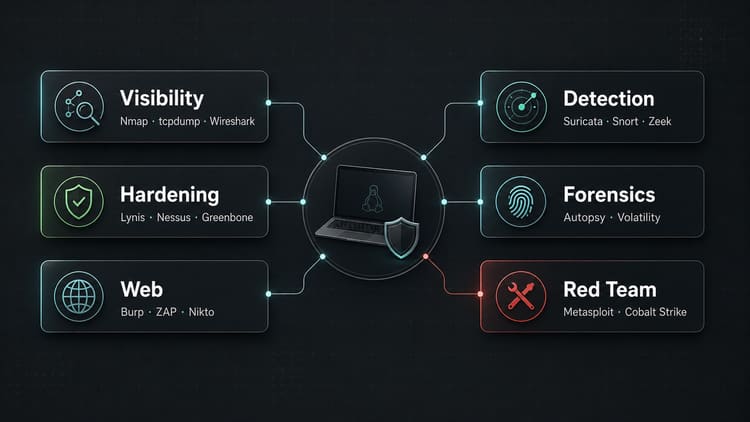
Visibility: Nmap, tcpdump, Wireshark.
External surface: Shodan, Censys, Amass, theHarvester.
Hardening: Lynis, Greenbone/OpenVAS, Nessus.
Web: Burp Suite, ZAP, Nikto, WPScan.
Detection: Suricata, Snort, OSSEC, SIEM.
NSM: Zeek, Security Onion, NetFlow/IPFIX, Full Packet Capture.
Forensics: Autopsy, The Sleuth Kit, Volatility, Guymager, Foremost, Binwalk.
Red team: Metasploit, Cobalt Strike, Core Impact, SQLMap, GoPhish, Evilginx শুধু mandate ও scope সহ।
Historical context: Cain & Abel, AirSnort, NetStumbler, Retina ও Ophcrack, সবসময় স্পষ্ট legacy label সহ।
উপসংহার
সেরা toolkit সবচেয়ে বড় তালিকা নয়, বরং যেখানে প্রতিটি tool-এর কারণ জানা থাকে।
Nmap ও Wireshark network বোঝায়। Lynis, Nessus ও Greenbone weakness দেখায়। Snort, Suricata, OSSEC ও SIEM অন্ধত্ব কমায়। Burp, ZAP ও WPScan web security-তে সাহায্য করে। Forensic tools incident-এর পরে অনুমান কমায়। Red-team tools বাস্তবসম্মতভাবে defense পরীক্ষা করে, তবে শুধু পরিষ্কার mandate-এ।
আসল সীমা “admin tool” ও “hacker tool”-এর মধ্যে নয়; responsible operation ও unauthorized use-এর মধ্যে।
আবার দেখা হবে,
Joe